
CATALYST.K
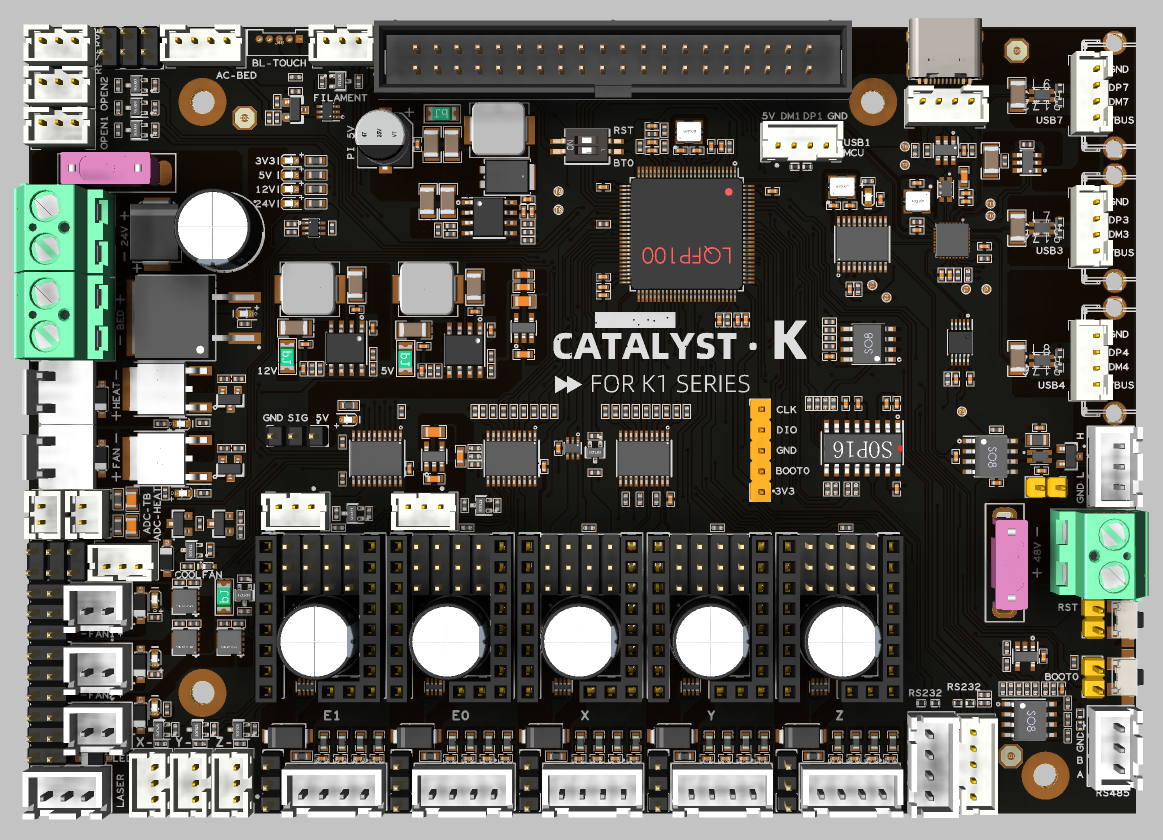
Introduction
This high‑performance 3D printer mainboard is built around an STM32H723 32‑bit MCU and comes in a 138 mm × 98 mm form factor. Designed for modern open‑source firmware such as Klipper, it connects to external SBCs like Raspberry Pi 3B+/4B/5B via USB to form a powerful “MCU + SBC” architecture, enabling high‑speed printing, multi‑axis motion control, and advanced feature expansion.
Features
- High‑performance MCU based on STM32H723 for demanding 3D printing workloads such as high‑speed interpolation and synchronized multi‑axis motion control.
- Native support for Klipper‑style setups via USB connection to Raspberry Pi 3B+/4B/5B or any Klipper‑compatible host.
- Five STEPSTICK sockets supporting flexible driver choices such as TMC5160 and TMC2209 to balance torque, smoothness, and silent operation.
- Selectable 24V/48V stepper motor supply with per‑motor voltage selection for mixed‑voltage motion systems.
- DC 24V input with 24V/10 A heated bed output, AC bed control signal output, and up to 5A hotend heater output for high‑power applications.
- On‑board regulated rails: 12V/3A, 5V/3A, 5V/6A (for Raspberry Pi power), and 3.3V/800 mA to power fans, sensors, and SBCs from a single board.
- Rich connectivity including 3× USB, 2× RS‑232, 1× RS‑485, and 1× high‑speed CAN interface for advanced expansions and distributed motion systems.
- Nine general‑purpose IOs and five fan outputs, with four voltage‑selectable (5V/12V/24V), plus an RGB header for status indication and lighting effects.
Applications
- Ideal as the main controller for mid‑ to high‑end FDM 3D printers, especially Klipper‑based high‑speed and multi‑axis systems.
- Suitable for upgrading existing printers from legacy 8‑bit or low‑performance boards to an STM32H7 + Klipper platform for higher speed and greater flexibility.
- Can be used in other motion‑control equipment requiring up to five stepper axes, 24 V / 48 V mixed supplies, and rich communication interfaces, such as small CNC machines, automation rigs, and laboratory devices.
Hardware Specifications
| Item | Specification |
|---|---|
| Board name | CATALYST.K |
| Board size | 138 mm × 98 mm |
| Microcontroller | STM32H723VGT6 |
| Firmware architecture | External Klipper host (Raspberry Pi 3B+/4B/5B, etc.) via USB connection |
| Stepper driver sockets | STEPSTICK sockets ×5, compatible with TMC5160 / TMC2209 / other STEPSTICK drivers |
| Motor supply voltage | 24V/48V selectable, per‑motor voltage selection supported |
| Board input | DC 24 V |
| HOTBED output | DC24V/10 A, with AC heated bed control signal output |
| HEAT output | Up to 5 A |
| USB Port | 3 + 1 (For MCU) , Powered by CH338F |
| CANBUS | 1 + 1 (For MCU) |
| Serial interfaces | RS‑232 ×2; RS‑485 ×1 |
| Fan | 5 (4x2Pin, 1x3Pin) |
| Temperature measurement | 2 |
| RGB light strip control | 1 |
| Signal input and output | 4 |
Operating Limits
Waining
The following values are tested at room temperature of 25°C. Please do not keep the highest peak value running for a long time!
Please do a good job of cooling the board in a higher temperature environment.
| Item | Operating Limit (recommended) |
|---|---|
| Stepper drivers | The peak current of a single stepper motor can reach 2A. |
| Mosfets Outputs | HOTBED up to 10A Max, HEAT up to 5A Max, Fan up to 0.5A each |
| Input power voltage | 24V for VIN up to 15A Max |
| Inputs/Outputs | Signal 20mA maximum, RGB power supply 1.5A total maximum |
| 5V and 3.3V current limit | 5V@6A Max,5V@3A Max,3.3V@0.8A Max |
Physical Connections
Pin Out
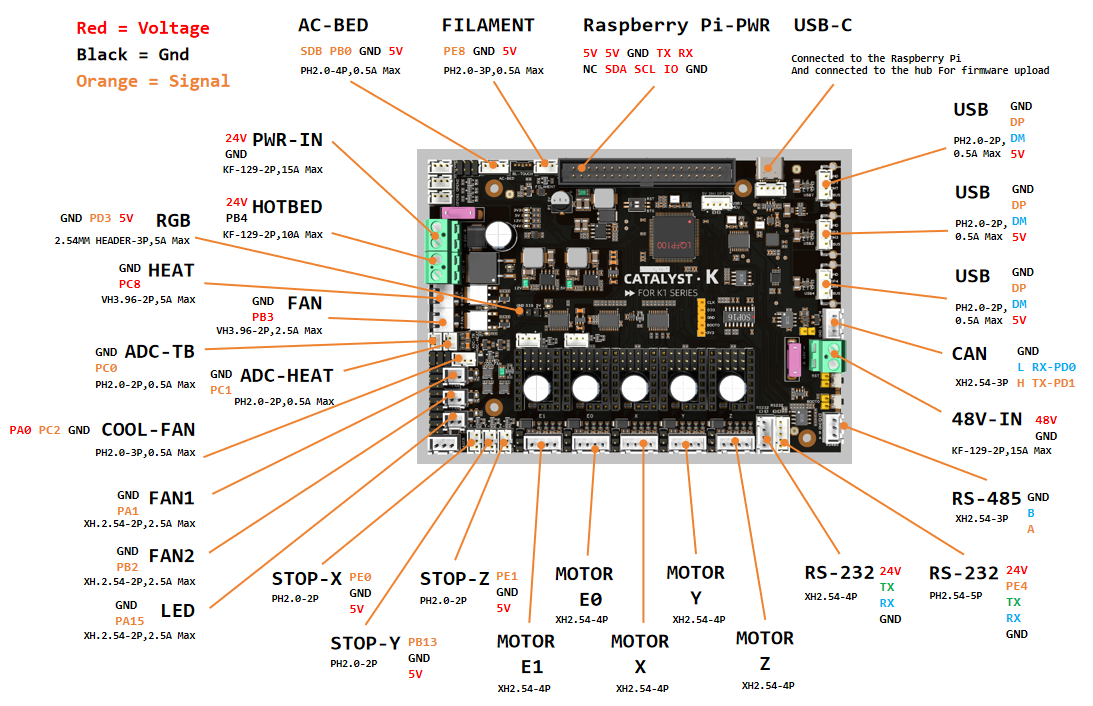
RGB0: PD3
LED: PA15

COOLFAN: PA0
COOLFAN_TACH: PC2
FAN: PB3
FAN1: PA3
FAN2: PB2

Heat: PC8
Bed: PB4
Thermistor (4.7k pull up): PC0
Thermistor (4.7k pull up): PC1

DriverX_EN: PE9
DriverX_DIR: PE10
DriverX_STEP: PE11
DriverX_UART/SPI_CS: PE7
DriverX_DIAG: PE0

DriverY_EN: PD9
DriverY_DIR: PB12
DriverY_STEP: PD8
DriverY_UART/SPI_CS: PE15
DriverY_DIAG: PB13

DriverZ_EN: PD15
DriverZ_DIR: PD13
DriverZ_STEP: PD14
DriverZ_UART/SPI_CS: PD10
DriverZ_DIAG: PE1

DriverE0_EN: PD4
DriverE0_DIR: PD6
DriverE0_STEP: PD5
DriverE0_UART/SPI_CS: PD7
DriverE0_DIAG: PC4

DriverE1_EN: PE5
DriverE1_DIR: PC13
DriverE1_STEP: PE6
DriverE1_UART/SPI_CS: PC14
DriverE1_DIAG: PD12

MOTOR_SPI
spi_software_mosi_pin: PE14
spi_software_miso_pin: PE13
spi_software_sclk_pin: PE12

AC_BED: PB0
Filament: PE8

CAN_RX: PD0
CAN_TX: PD1

USB_DM: PA11
USB_DP: PA12
Description Of Connections
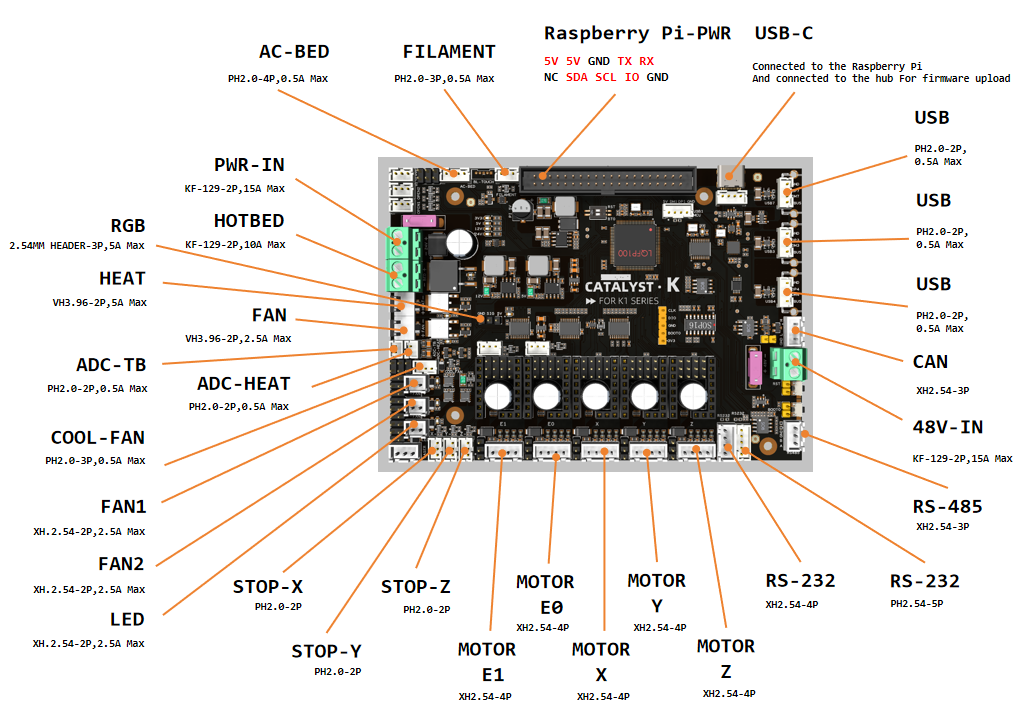
| Connector | Pin | Default function | Altermate |
|---|---|---|---|
| HOTBED | PB4 | Mosfet Output, Heated bed output control, 10A Max | |
| AC-BED | PB0 | Mosfet Output, AC heated bed pwm Signal control | |
| RGB | PD3 | 5V Digital Output, For 5V WS2812/SK6812 RGB/Servo | Digital Output |
| HEAT | PC8 | Mosfet Output, Heating rod control, 5A Max | |
| FAN | PB3 | Mosfet Output, For 2 pins Fan | |
| ADC-TB | PC0 | ADC input, 4.7K pull-up, HOTBED temperature measure | Analog signal Input |
| ADC-HEAT | PC1 | ADC input, 4.7K pull-up, HEAT temperature measure | Analog signal Input |
| COOL-FAN | COOL-FAN: PA0 COOL-FAN_TACH: PC2 |
Mosfet Output, For 3 pins Fan (Header voltage selector) |
Digital Output |
| FAN1 | PA3 | Mosfet Output, For 2 pins Fan (Header voltage selector) |
Digital Output |
| FAN2 | PB2 | Mosfet Output, For 2 pins Fan (Header voltage selector) |
Digital Output |
| LED | PA15 | Mosfet Output, For 2 pins LED (Header voltage selector) |
Digital Output |
| STOP-X | PE0 | Digital Input, For endstop, Micro switch or Hall (Pad voltage selector) |
I/O |
| STOP-Y | PB13 | Digital Input, For endstop, Micro switch or Hall (Pad voltage selector) |
I/O |
| STOP-Z | PE1 | Digital Input, For endstop, Micro switch or Hall (Pad voltage selector) |
I/O |
| MOTOR E1 | For two-phase stepper motor, 24V/48V (Header voltage selector) |
||
| MOTOR E0 | For two-phase stepper motor, 24V/48V (Header voltage selector) |
||
| MOTOR X | For two-phase stepper motor, 24V/48V (Header voltage selector) |
||
| MOTOR Y | For two-phase stepper motor, 24V/48V (Header voltage selector) |
||
| MOTOR Z | For two-phase stepper motor, 24V/48V (Header voltage selector) |
||
| RS-232 | XH2.54-4 Connected to the CH347T, and connected from the CH347T to the CH338F HUB chip. | ||
| RS-232 | SYNC:PE4 | PH2.0-5 Connected to the CH347T, and connected from the CH347T to the CH338F HUB chip. | |
| RS-485 | PH2.0-5 Connected to the CH340E, and connected from the CH347T to the CH338F HUB chip. | ||
| CAN | CAN_H/TX:PD1 CAN_L/RX:PD0 |
CAN BUS | |
| USB1 | - | Connected to the CH347T PHUB chip | |
| USB2 | - | Connected to the CH347T PHUB chip | |
| USB3 | - | Connected to the CH347T PHUB chip | |
| USB-C | - | Connected to the Raspberry Pi And connected to the hub For firmware upload | |
| FILAMENT | PE8 | Digital Input, For endstop, Micro switch or Hall (Pad voltage selector) |
I/O |
Header Jumpers
As shown in the figure, To use a 48V stepper motor, connect a 48V power supply to the KF-129 terminal on the right side of the mainboard. By default, the system operates on a single power supply (DC24V). The motor voltage selection jumper is connected to 24V.
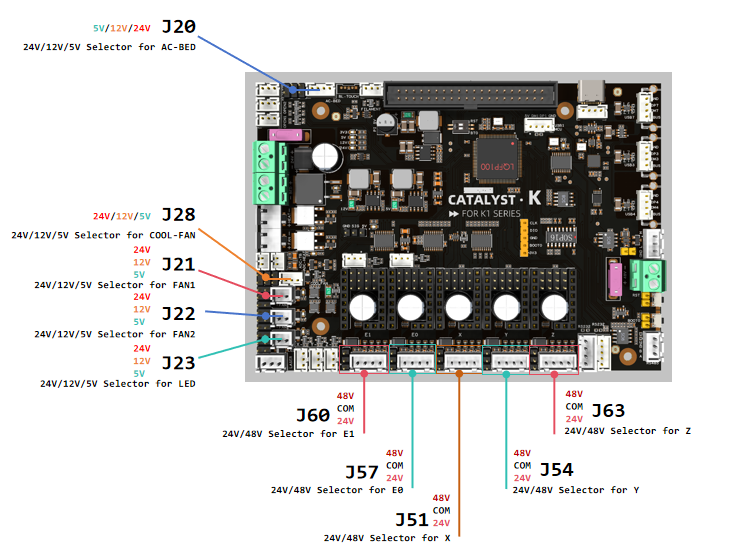
Note
Please note that if these interfaces are used as outputs, the high-level voltage of the output is consistent with the voltage selected by the jumper. Please make sure that your peripherals can withstand the range. Generally speaking, only SSR in the accessories of 3D printers can withstand 9-36V control voltage.
Connection
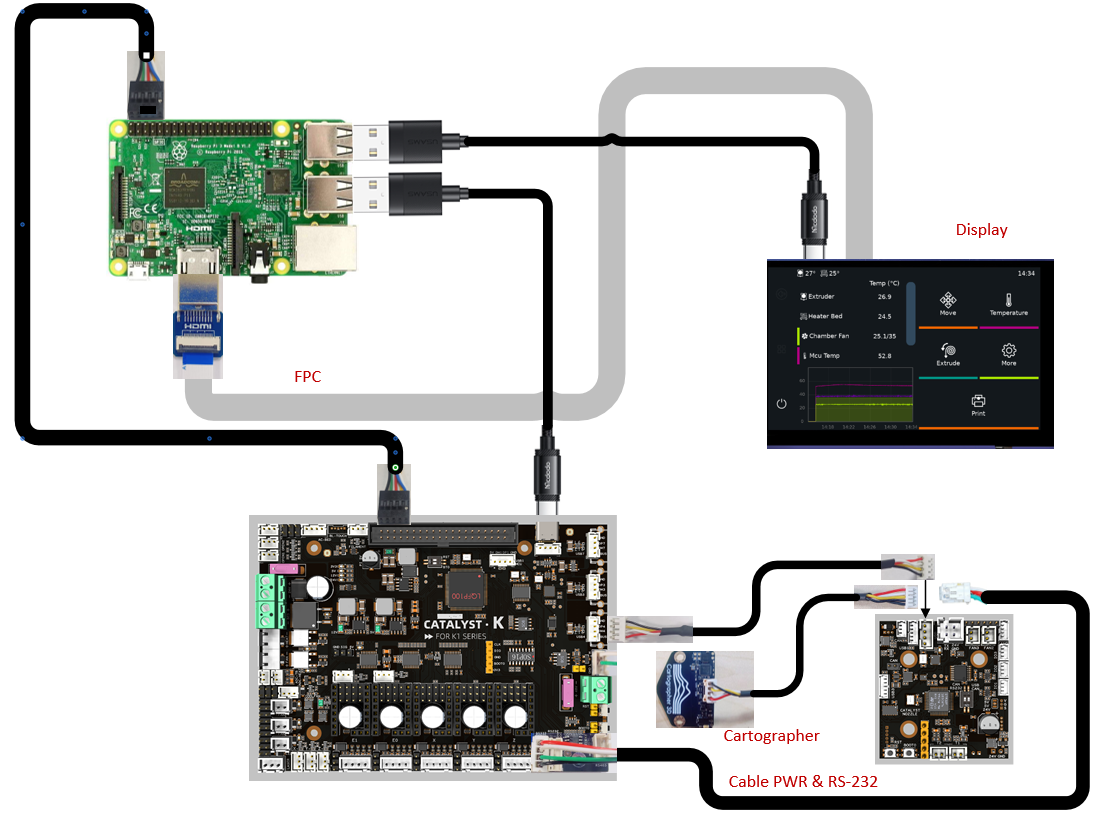
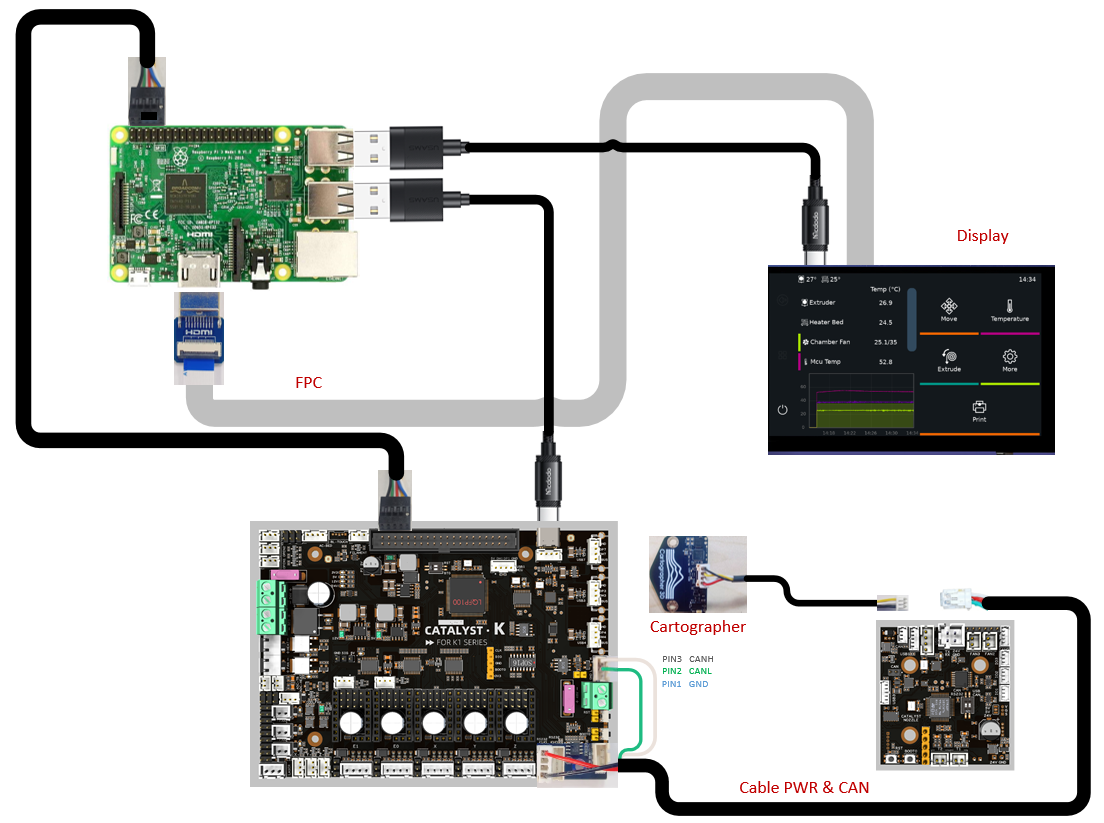
Simply connect our motherboard (CATALYST.K) to the Raspberry Pi's header power port and USB port using a power cable and data cable (USB to Type-C), respectively, as shown in the diagram below. No additional power supply is required for the Raspberry Pi, as our motherboard provides 5V@6A power output—more than sufficient to ensure the Raspberry Pi operates normally.
CATALYST.K_Kit
- CATALYST.K_Kit is a kit comprising a main control board (CATALYST.K) and a tool board (Catalyst.K ToolHead).
- USB mode is the recommended operating mode.
- CATALYST.K connects to the Raspberry Pi via USB when operating in USB/CAN mode.
USB Communication Mode (Recommend)
- Connect the RS-232 connector (XH2.54-4) on the main board (CATALYST.K) to the power connector (J1) on the tool board (Catalyst.K ToolHead)
- Connect the USB connector (USB4) on the main board (CATALYST.K) to the connector (J4) on the tool board (Catalyst.K ToolHead).
- Connect J23 on the tool board (Catalyst.K ToolHead) to the Cartographer.
- Set PIN 1 on the DIP switch (WS3) on the Catalyst.K ToolHead to ON and PIN 2 to ON. This completes the hardware connections.
Note
- For more information on the Catalyst.K ToolHead, please refer to: https://wiki.fysetc.com/docs/Yo6J22mg?preview=1
- The display screen is the original one pre-installed on the K1 Max machine.
- The RS232 communication cable and power supply cable are bundled together. To provide power, they must be connected. USB and CAN can each be connected separately.
- For detailed information on Cartographer, please refer to https://docs.cartographer3d.com/
CAN Communication Mode
- Connect the RS-232 connector (XH2.54-4) on the main board (CATALYST.K) to the power terminal (J1) on the tool board (Catalyst.K ToolHead), and strip the white and green data wires from the cable harness to connect them to PIN 1 and PIN 2 of the CAN (XH2.54-3) connector on the main board (CATALYST.K), respectively.
- Connect J21 on the Catalyst.K ToolHead to the Cartographer.
- Set PIN 1 of the DIP switch (WS3) on the Catalyst.K ToolHead to OFF and PIN 2 to ON. This completes the hardware connections.
Peripheral Connection
To connect K1 Max peripherals to the CATALYST.K, please refer to the diagram below.
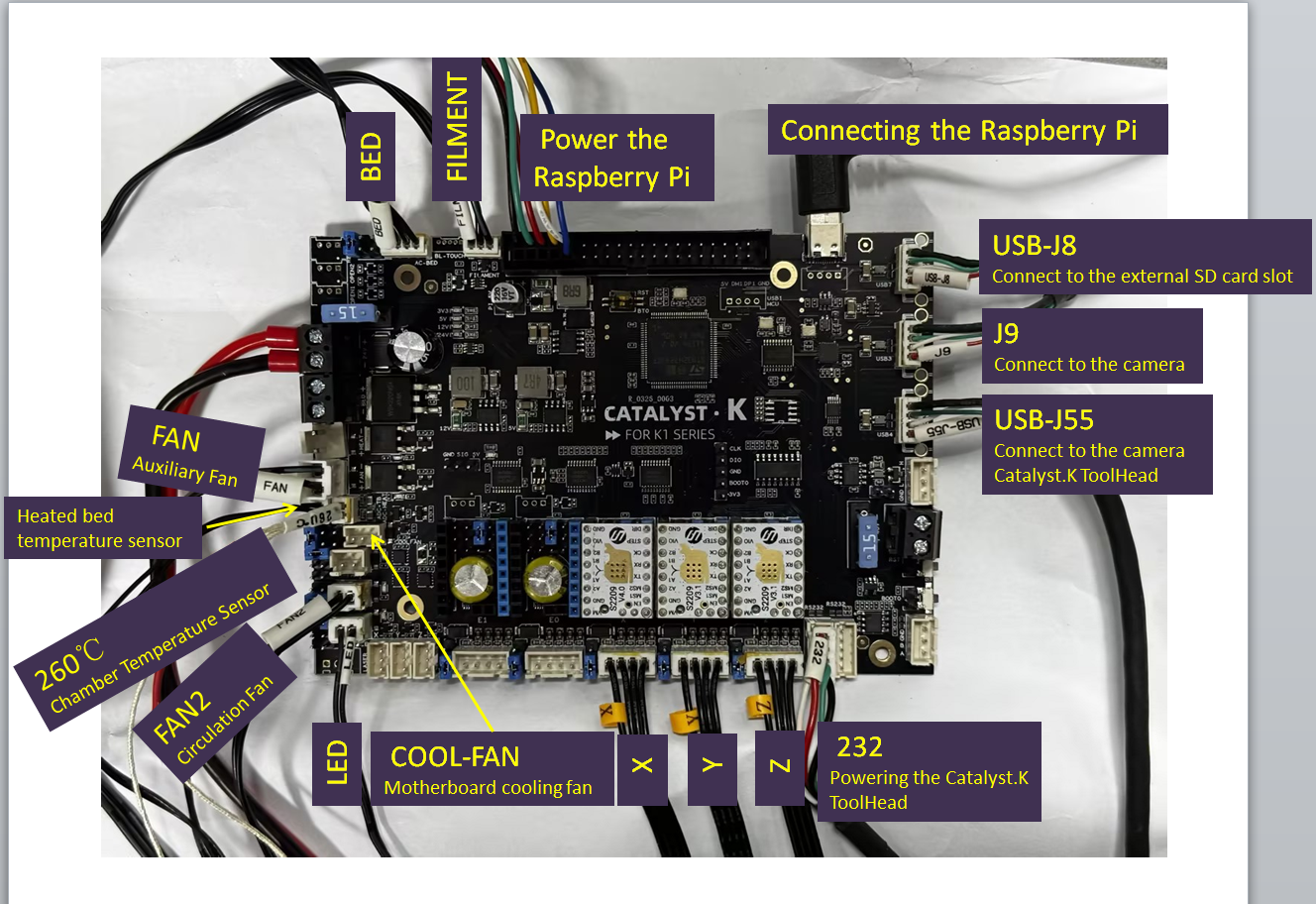
Please refer to the Description Of Connections for peripheral terminal definitions.
Firmware Guide
Firmware Configuration
Warning
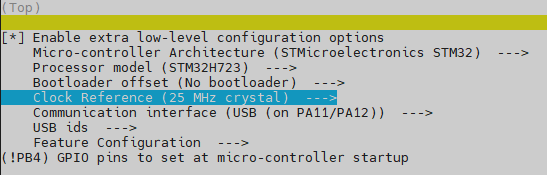
Please use the setting below to create the firmware for the Catalyst K board. The !PB4 line is important to prevent the Heated Bed from heating at boot. Please do this when you receive the board as a matter of the install.
HOWEVER be aware that going into DFU mode will renable the bed.
It is therefore important to not to connect any heaters, during the flashing firmware process
Klipper With No Bootloader (Recommend)
Warning
- The host computer (such as a Raspberry Pi) must be connected to Wi-Fi or Ethernet. After obtaining the host computer's IP address using a LAN scanning tool such as Angry IP Scanner, you can then use an SSH tool to login to the host computer.
Login to the host computer using tool such as MobaXterm or PuTTY via SSH, and execute the following command to open the firmware configuration tool.
cd ~/klipper
make menuconfig
The recommended mode is USB mode and the configuration is as follows.
USB (Recommend)
Waining
- If Catalyst.K ToolHead uses SERIAL communication mode, the CATALYST.K needs to be configured to USB communication mode.
- Catalyst.K cannot operate in Serial mode.
CAN
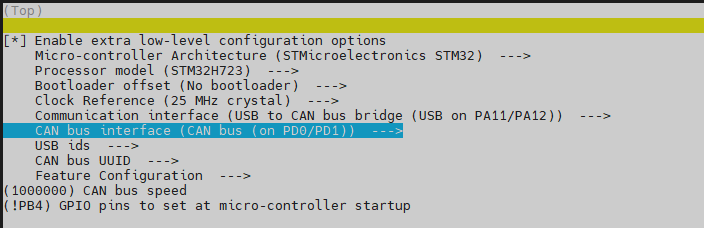
Complete the configuration shown in the reference image , then save the configuration and exit the configuration tool.
Note
If using Katapult, please refer to:
https://github.com/Arksine/katapult?tab=readme-ov-file#uploading-klipper
Firmware Upload
Waining
- Before flashing the firmware, connect the Raspberry Pi and CATALYST.K using a USB cable,refer to the connection diagram USB Communication Mode (Recommend).
- Before flashing the firmware, must complete the firmware configuration,refer to the Firmware Configuration
- If the firmware is configured for CAN mode, please re-verify the wiring connections after the firmware flashing process is complete, refer to the connection diagram CAN Communication Mode.
DFU mode
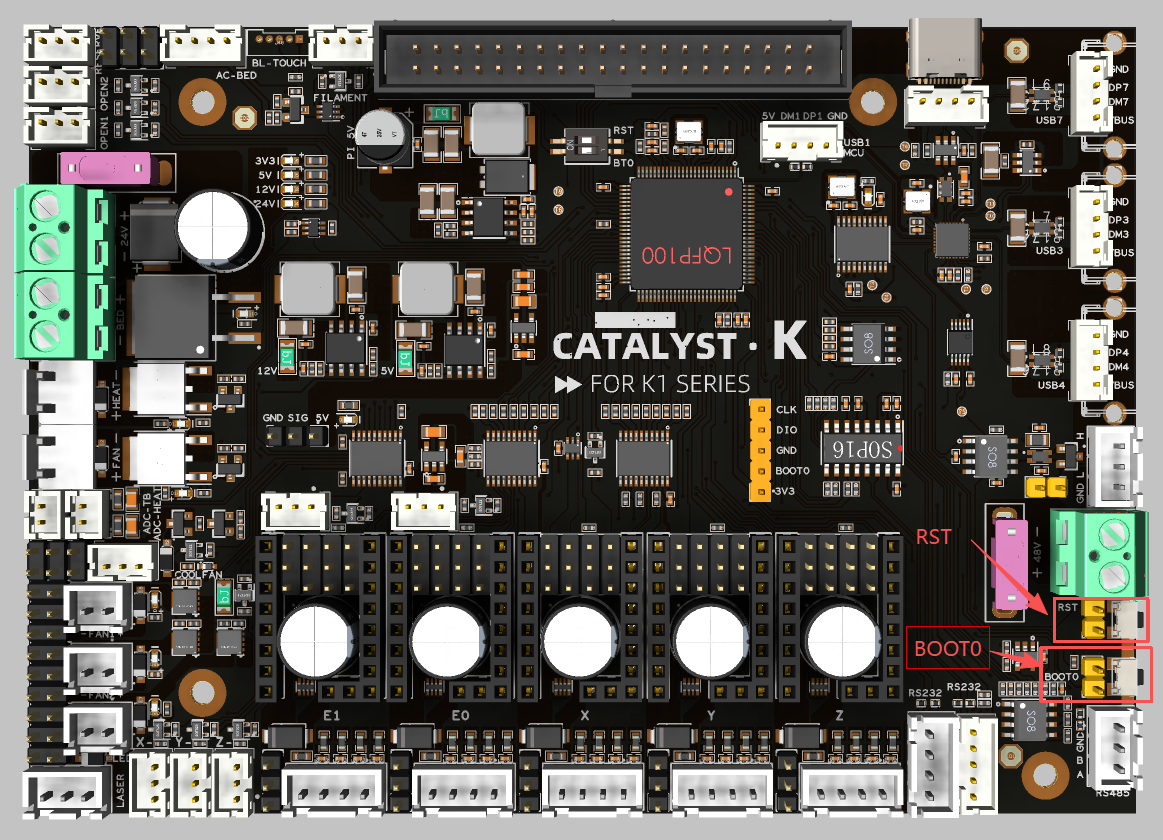
You need to enter DFU mode before you can compile and burn the firmware. As shown in the figure above,
- press and hold BOOT0,
- press the RESET button for one second,
- release RESET,
- wait for 3 seconds,
- release BOOT0.
Use the command 'lsusb' to check if a DFU device is detected. If it appears, proceed with uploading the firmware. If not, repeat the previous steps.
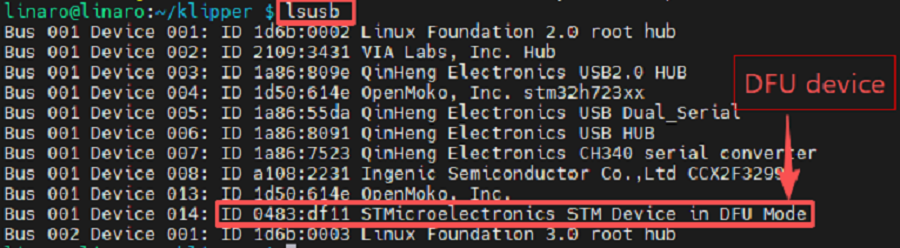
Firmware flash
After the device is in DFU mode, execute the following commands to compile and flash the program.
make flash FLASH_DEVICE=0483:df11After the burning process is complete, it will display "File downloaded successfully".
ID Search
Warning
- The ID can only be recognized after the firmware flashing process is complete. If it has not yet finished, please refer to the Firmware Upload section.
- If Mainsail or KlipperScreen indicates that it cannot connect to the MCU, you must modify the MCU ID before attempting to reconnect.
-
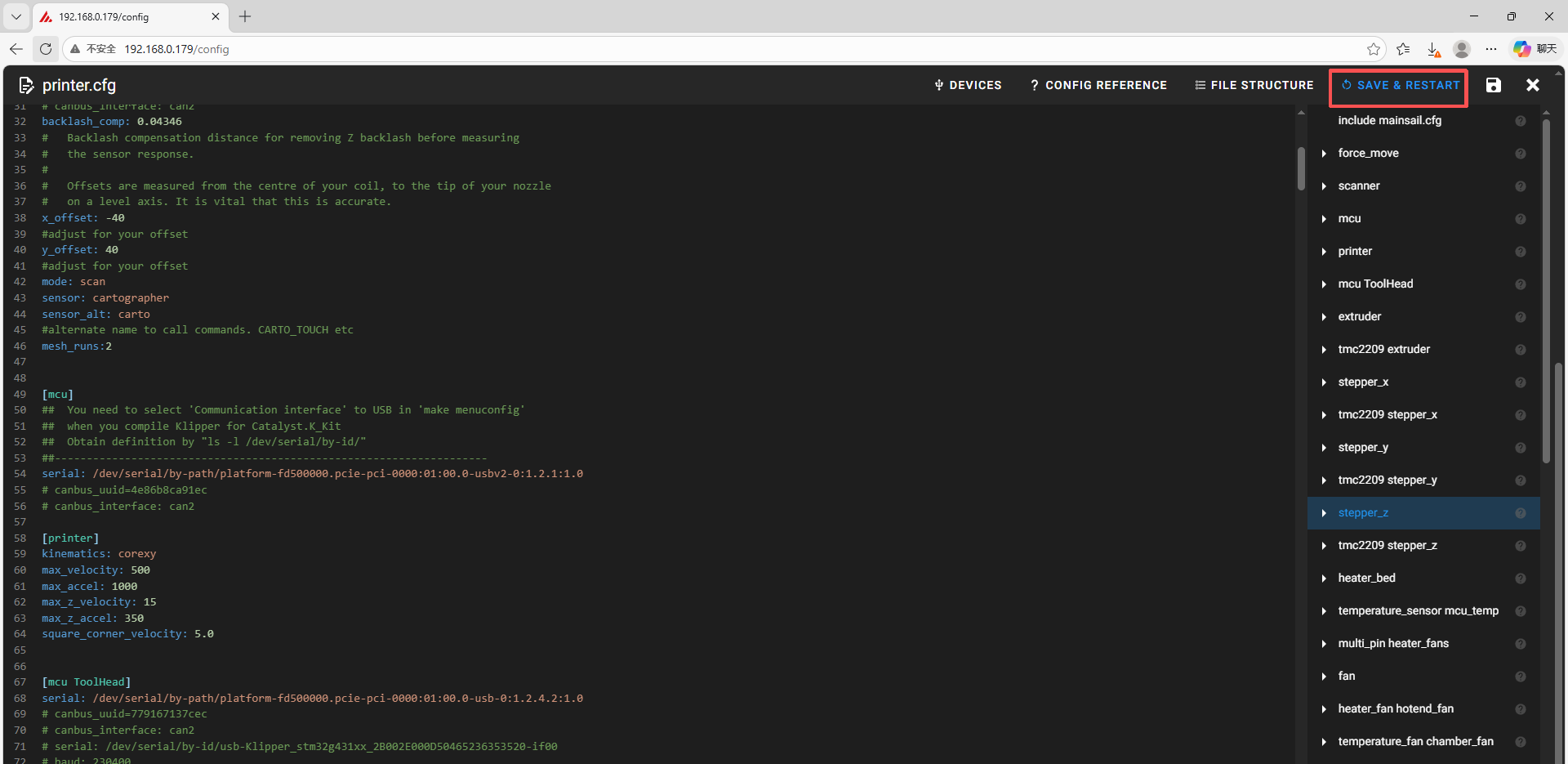
Open your browser, enter the IP address of the host computer in the address bar, for example, my host computer's IP is 192.168.0.179, just enter it and press Enter.
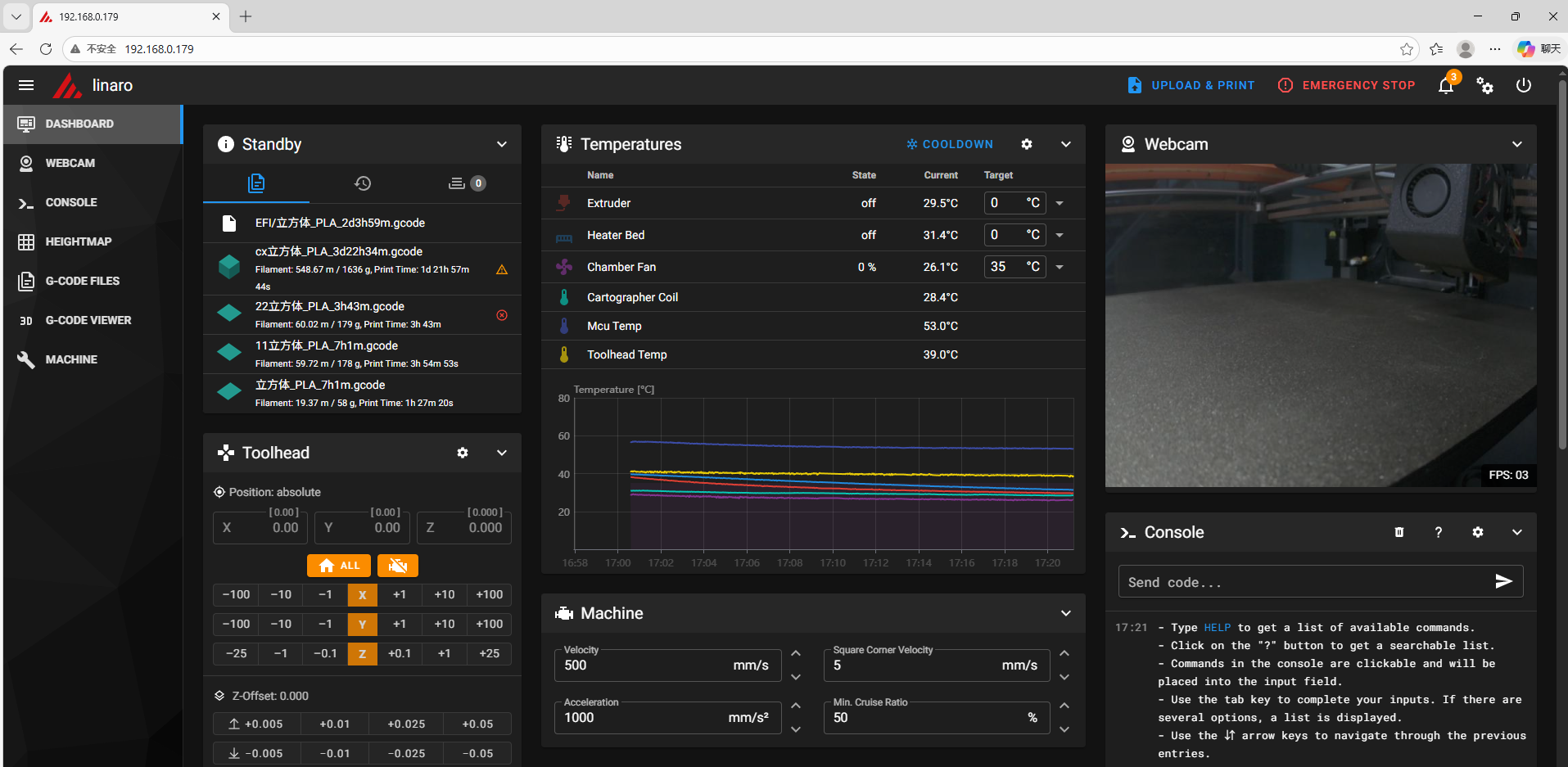
-
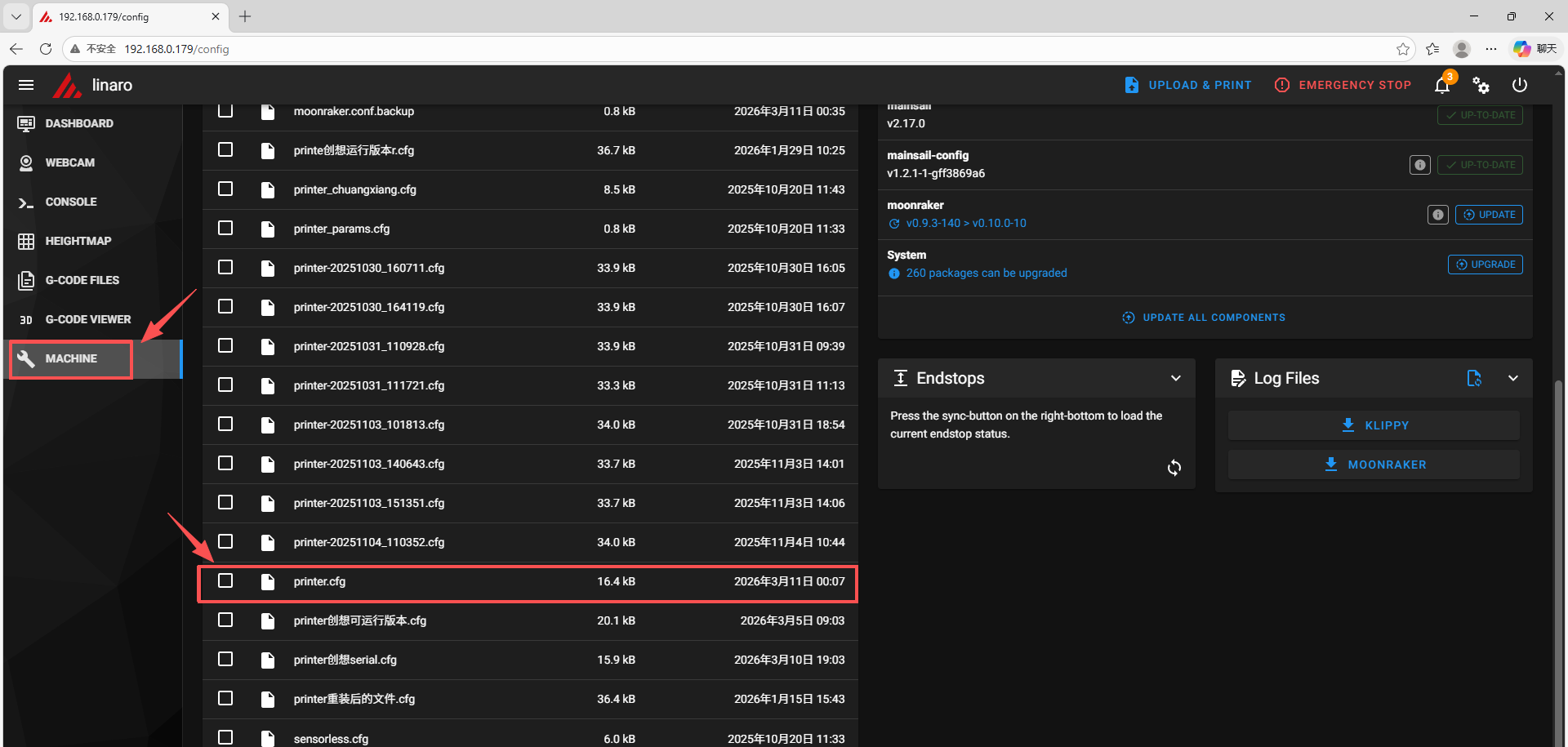
Open the web interface of the host computer, and find "Machine" in the configuration options on the left sidebar. Click to open the printer.cfg file.
-
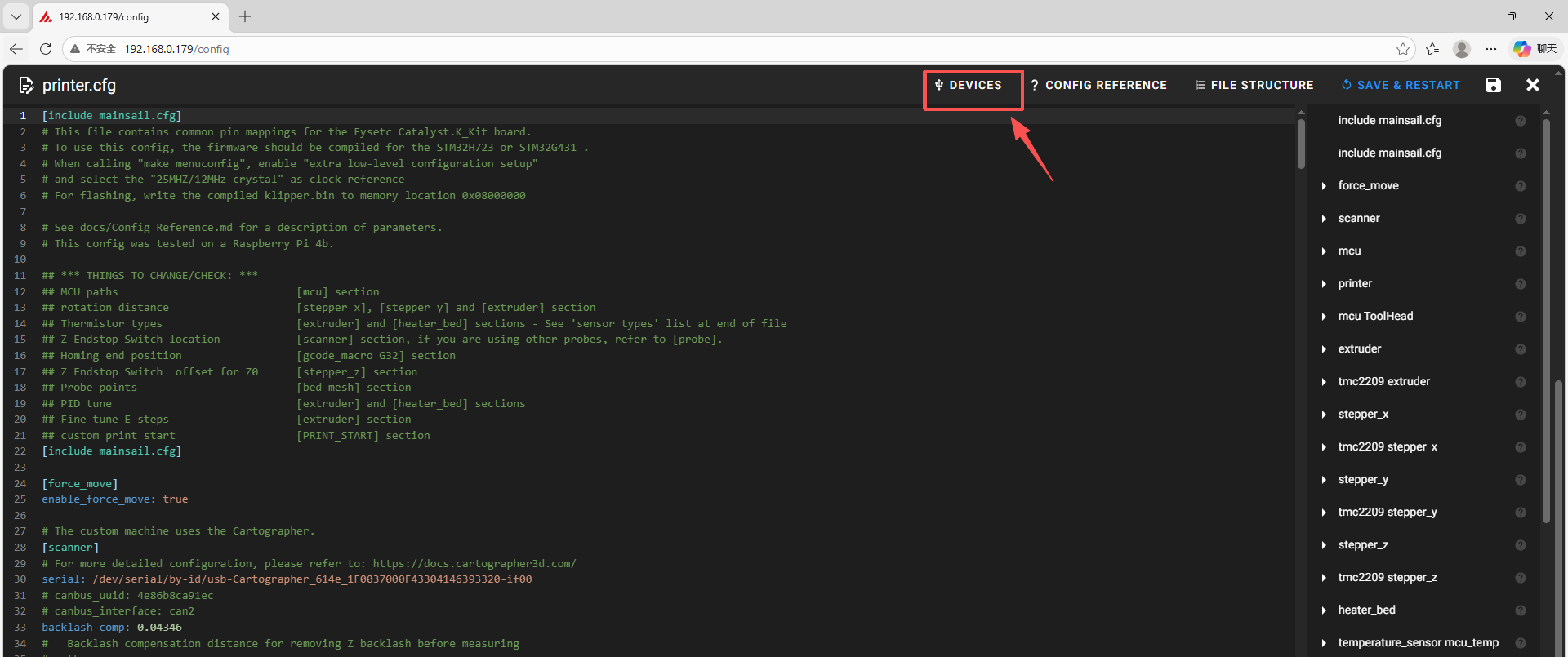
Click the DEVICES button in the upper right corner.
Note
If DEVICES cannot be found, you need to reinstall Mainsail.
-
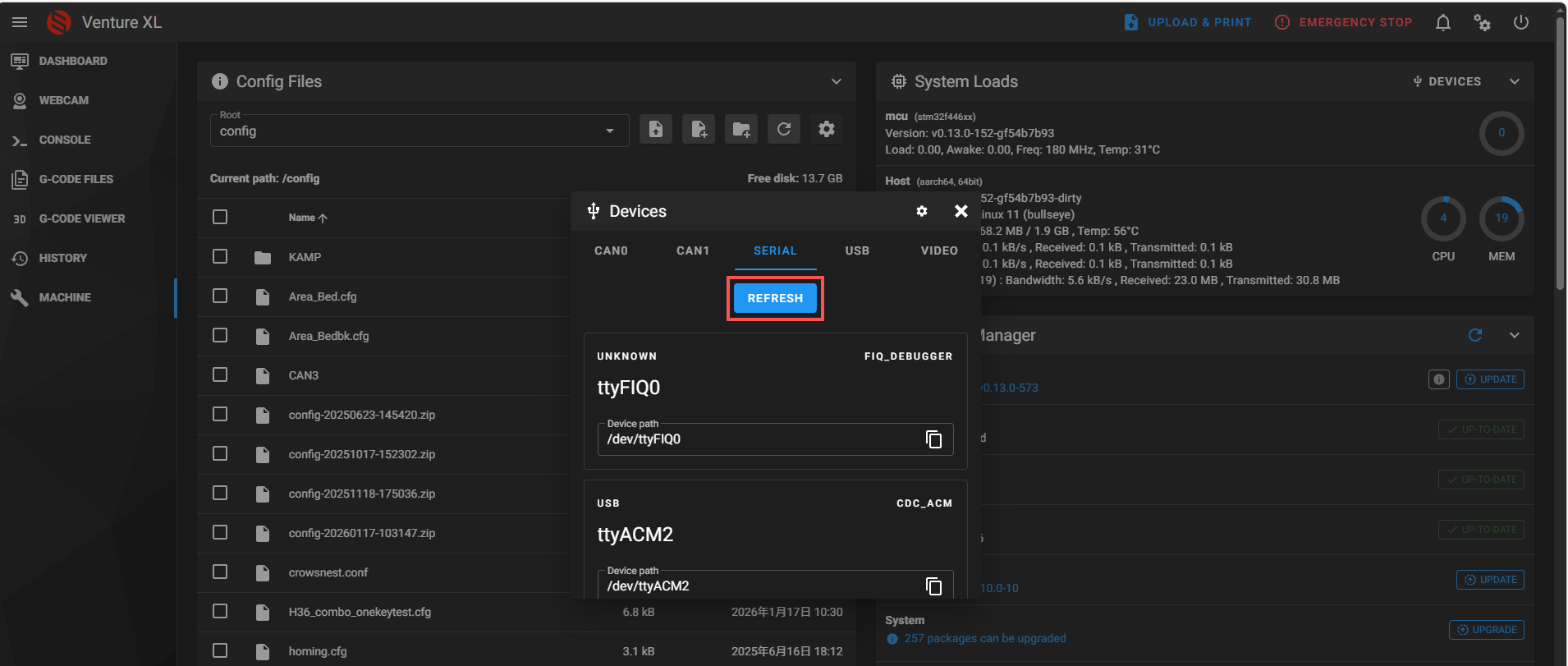
After selecting the communication method, click refresh.
-
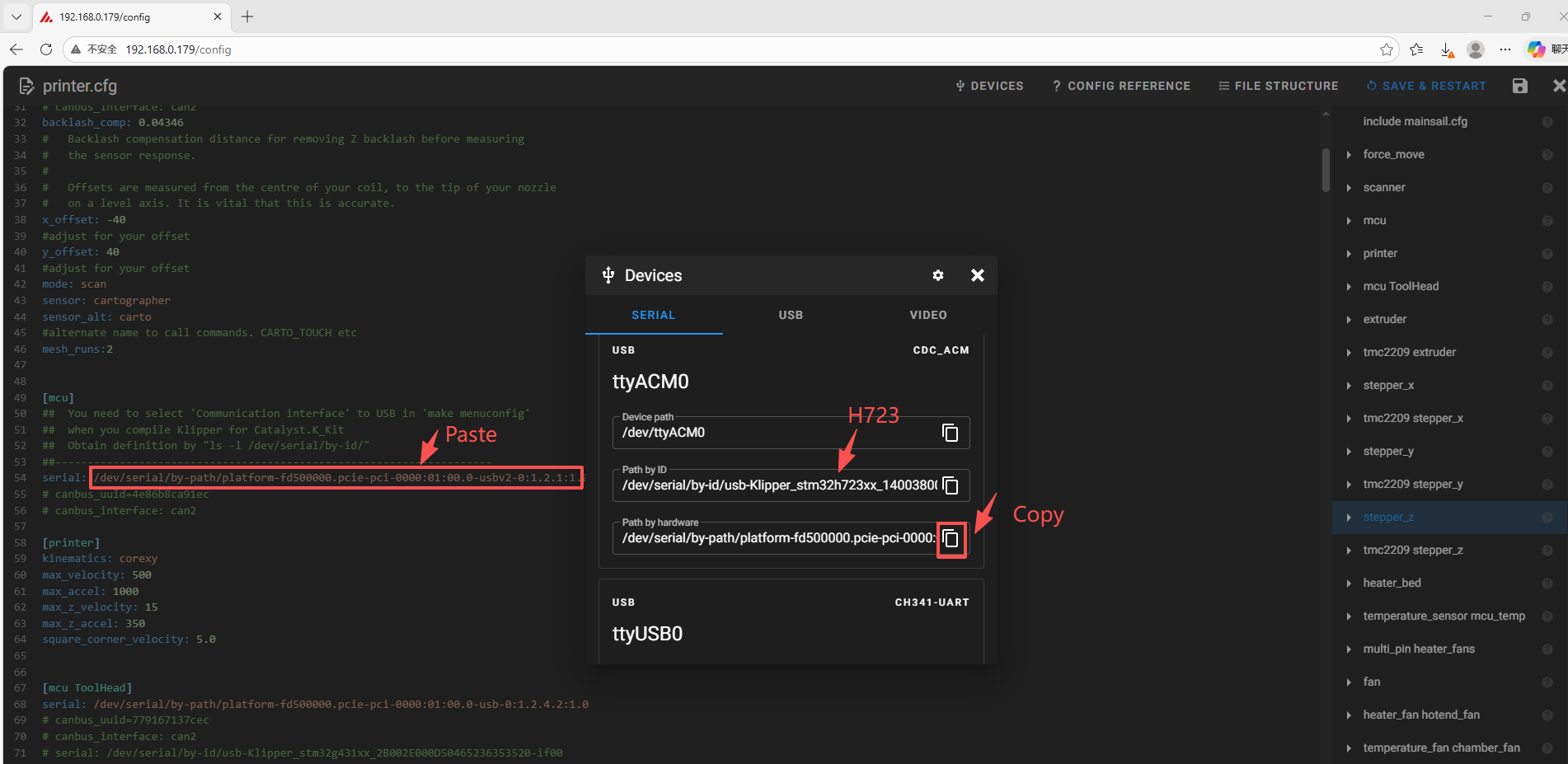
Copy the ID and paste it into the [mcu] section of printer.cfg.
-
Click the save and restart button in the upper right corner.
Attachments And Other Documents
2D,3D , SCH and config template file, please go to our github:
https://github.com/FYSETC/Catalyst.K_Kit