
CHAMELEON X5
Introduction
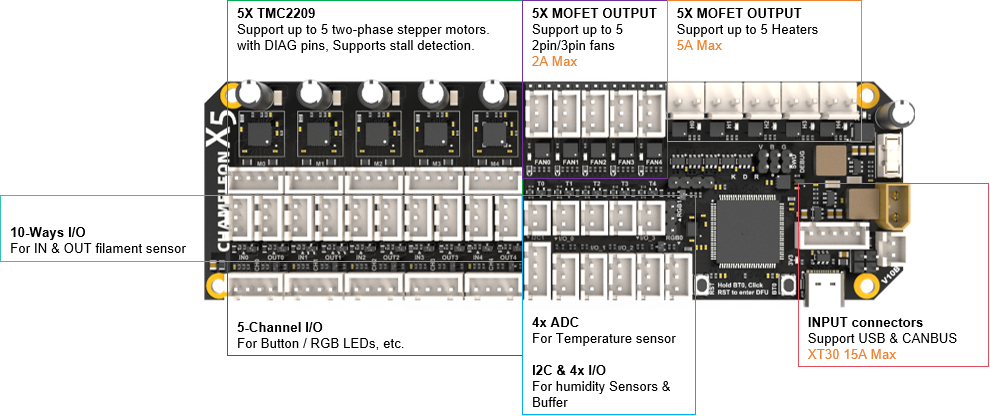
The Chameleon X5 can be used in various multi-color applications requiring multiple motors to work together, such as Type-A, Type-B, and Type-C systems. It also includes the necessary fan/heating control and temperature detection circuits for heating and drying functions.
It is based on the STM32F407VET6 microcontroller and TMC2209 stepper motor driver chip, with each channel equipped with the necessary I/O interfaces for filament input/output monitoring and status indication (buttons and LEDs) to ensure stable feeding.
The optional 5-channel heating and drying function includes dedicated interfaces for fan control and heating elements, as well as NTC temperature measurement, and also supports I2C sensors, such as temperature and humidity sensors.
Features
- Dimensions: 154mm x 48mm
- Based on STM32F407VET6 (168MHz Cortex-M4)
- Supports CANBUS & USB communication
- Onboard Power Supply:
- Input: 24V @ 15A max
- Onboard DC-DC power supply: 12V @ 3A, 5V @ 3A, 3.3V @ 0.8A
- 5-channel Material Feeding Support:
- 5 onboard TMC2209 drivers, supporting 5 stepper motors
- 10 general-purpose I/O pins for material insertion/extrusion monitoring
- 5 dual I/O connectors for buttons and LED indicators (with level shifting)
- 5-channel Hot Air Drying Support:
- 5x fans, support 2/3 fans, 12V/24V selectable, 2A Max
- 5x heating interfaces, 5A Max
- 5x NTC temperature sensor interfaces for temperature detection
- 1x I2C interface for temperature and humidity sensors
- 4x general-purpose I/O pins, use for external buffers
- 2x Neopixel RGB interfaces for indication or lighting
- Onboard BOOT0 and RST buttons
- Independent input interface board
Wiring
Powering The X5
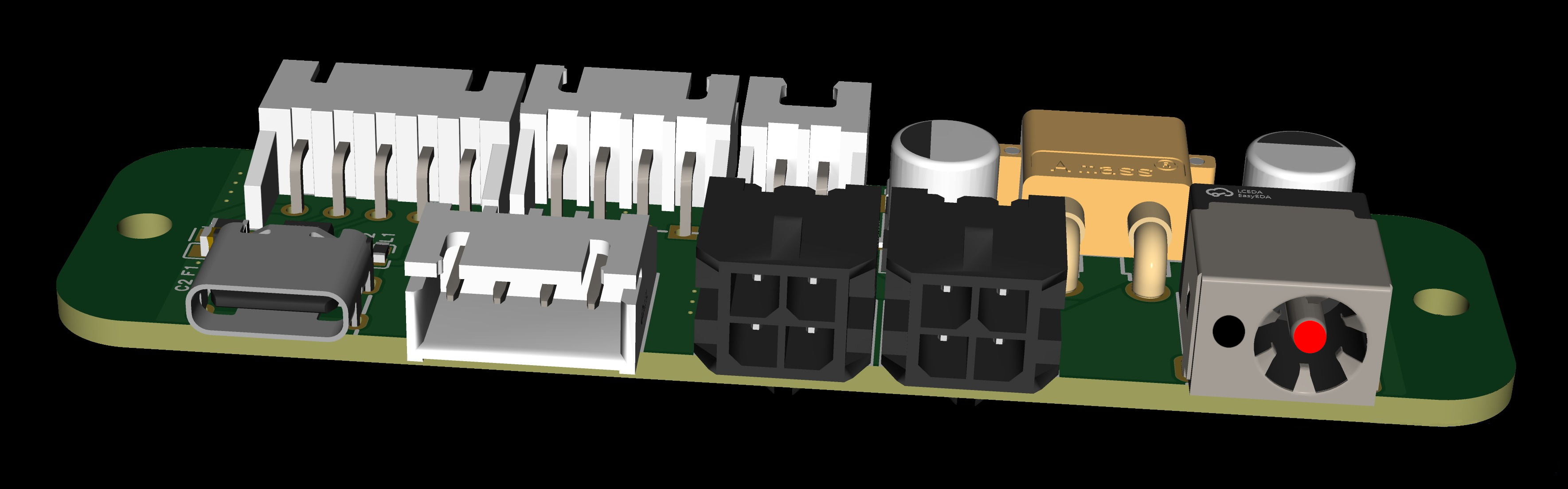
The X5 board needs an input voltage of 24v for both CAN and USB connection methods. This can be supplied via either the DC Barrel Jack or Microfit3 connector on the X5 I/O board.
DC Barrel Jack
The DC barrel jack is 5.5*2.1, and center-positive. This should be wired directly to 24v PSU of the printer.
| Barrel Jack | Value |
|---|---|
| RED | 24v |
| BLACK | GND |
MicroFit3
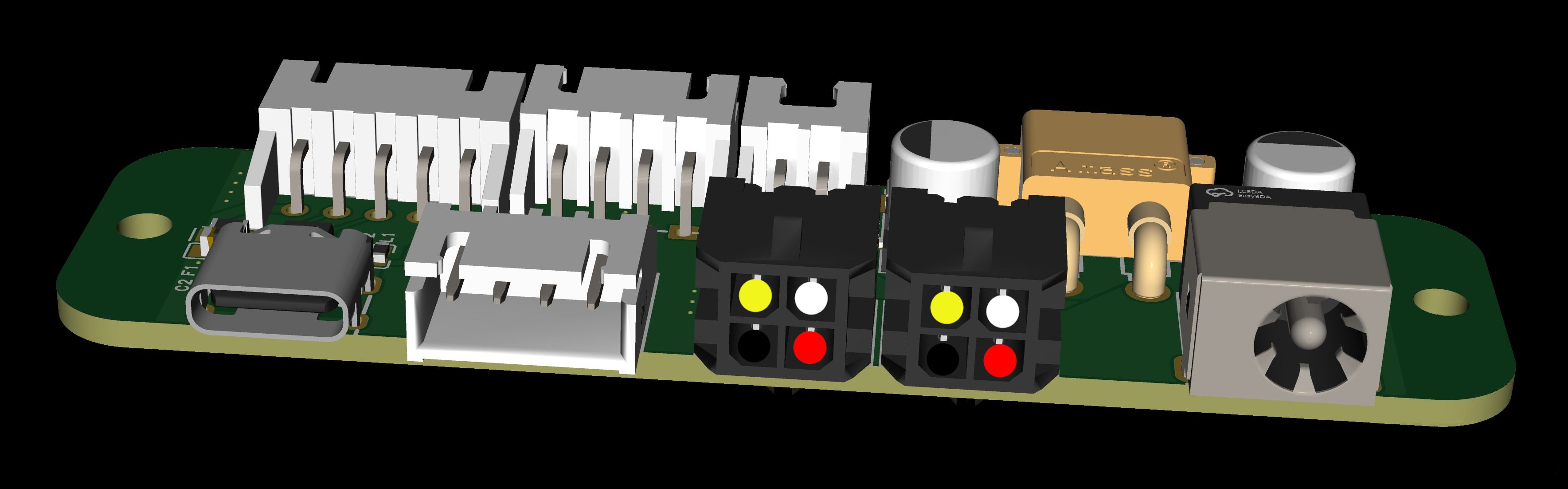
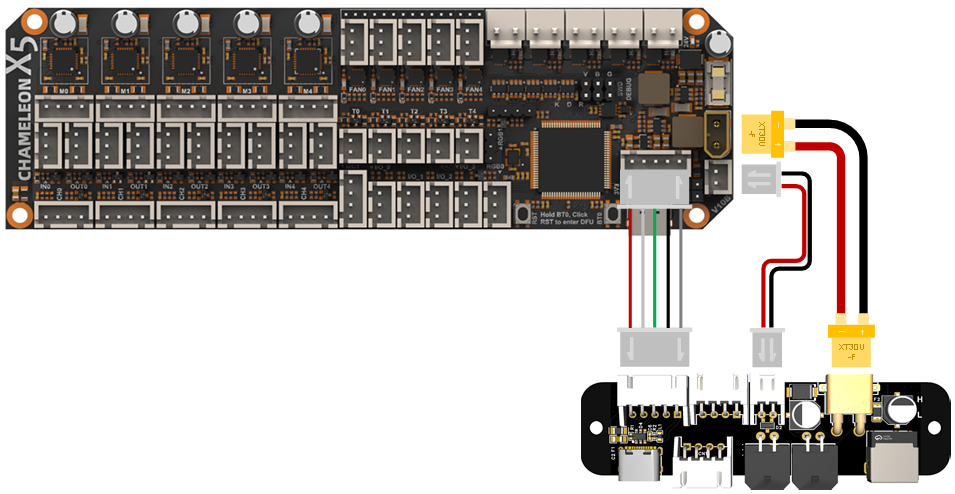
The microfit3 is a 2x2 female connector. This connector allows both the 24v and GND connections, as well as the CAN data connections.
| Microfit3 | Value |
|---|---|
| RED | 24v |
| BLACK | GND |
| YELLOW | CAN H |
| WHITE | CAN L |
USB
To use the Chameleon X5 on a USB connection, power the board with either the DC barrel jack or microfit3 connector and then connect the USB C cable from I/O board to the SBC (Raspberry Pi, Orange Pi, BTT Pi etc) of your printer.
CAN
To use the Chameleon X5 on a CAN connection. Use the microfit3 connector to supply both power and data using the diagram above to connect CAN H and CAN L to the corresponding CAN connection on your printer setup.
Wiring Examples
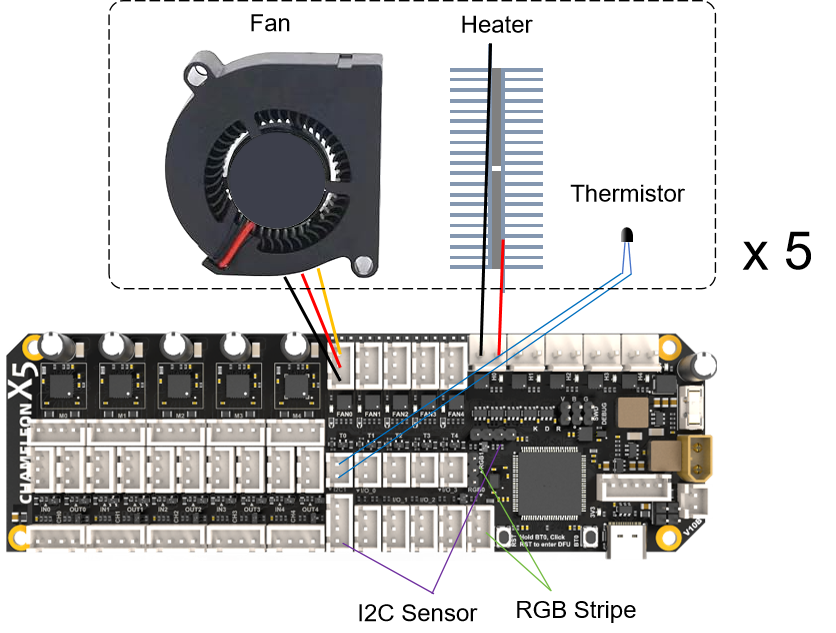
5 ways Heating and Drying example
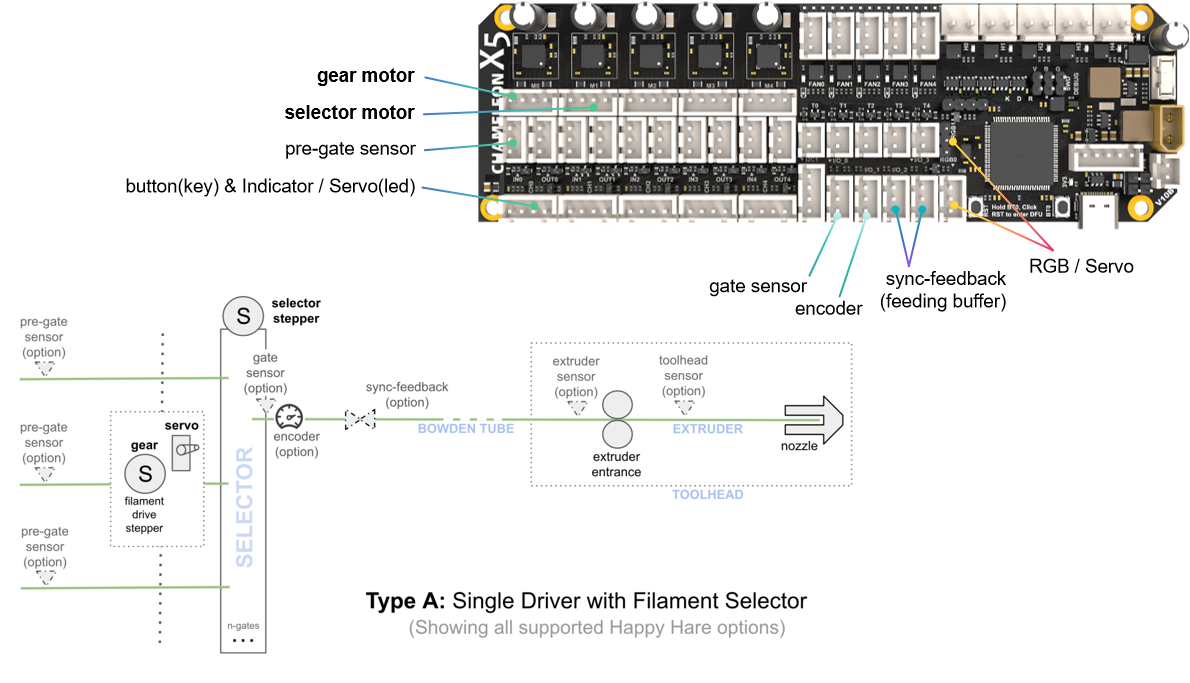
Type A usage example
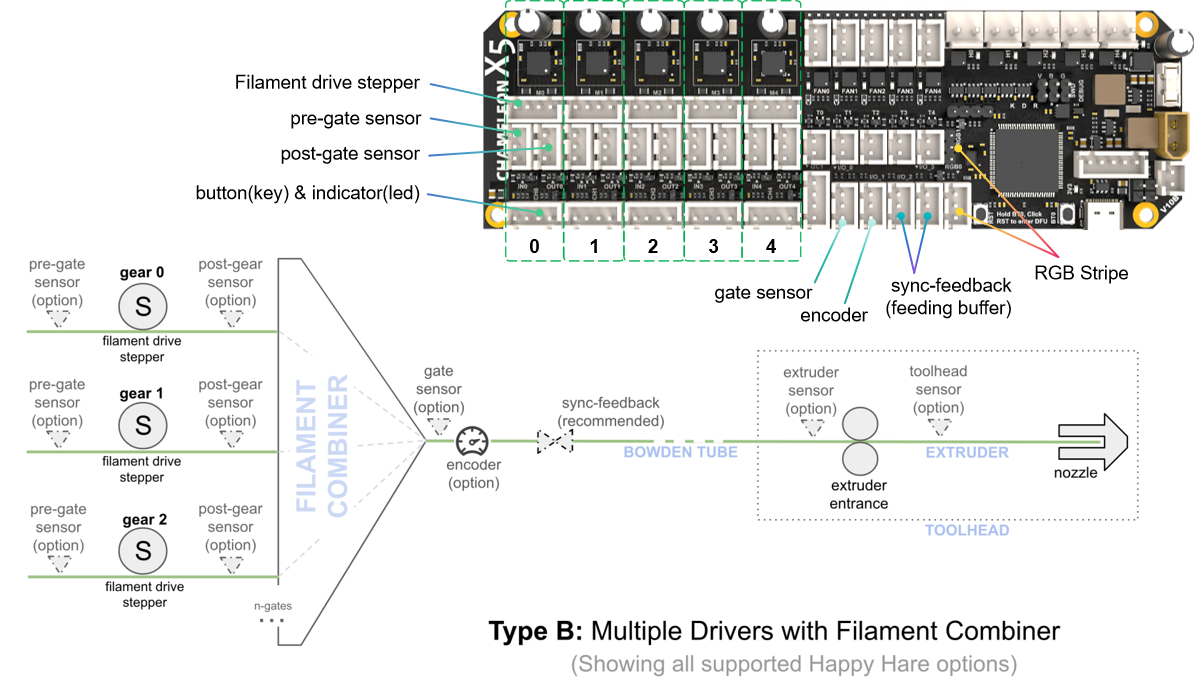
Type B usage example
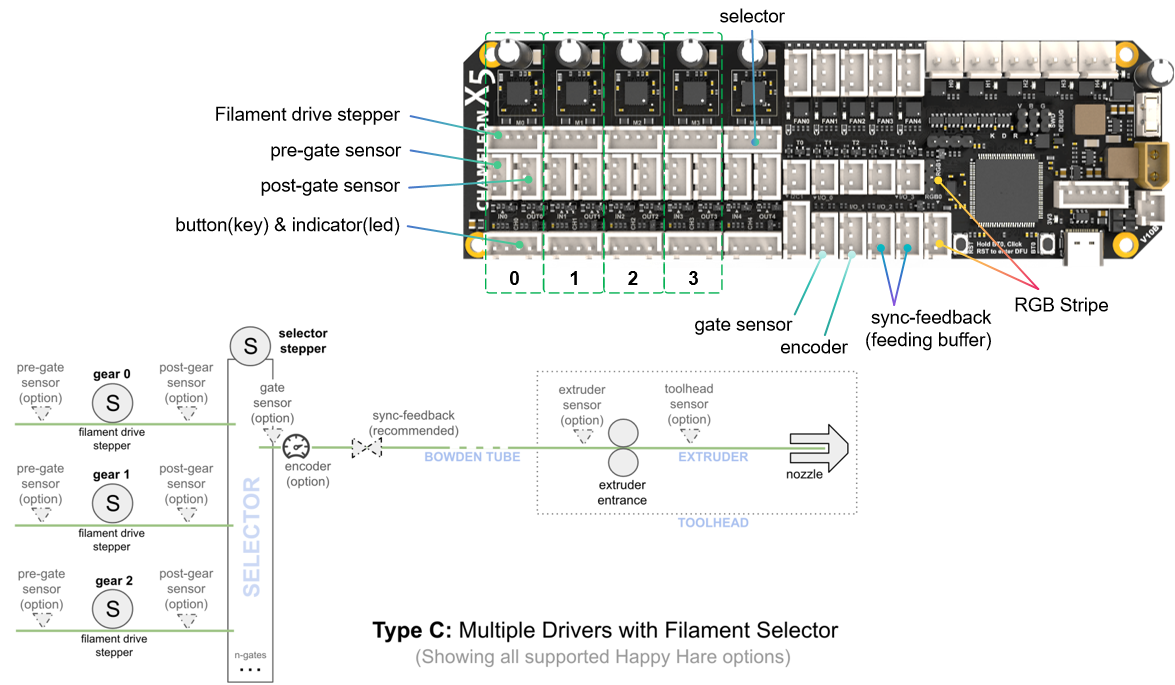
Type C usage example
X5 I/O Board
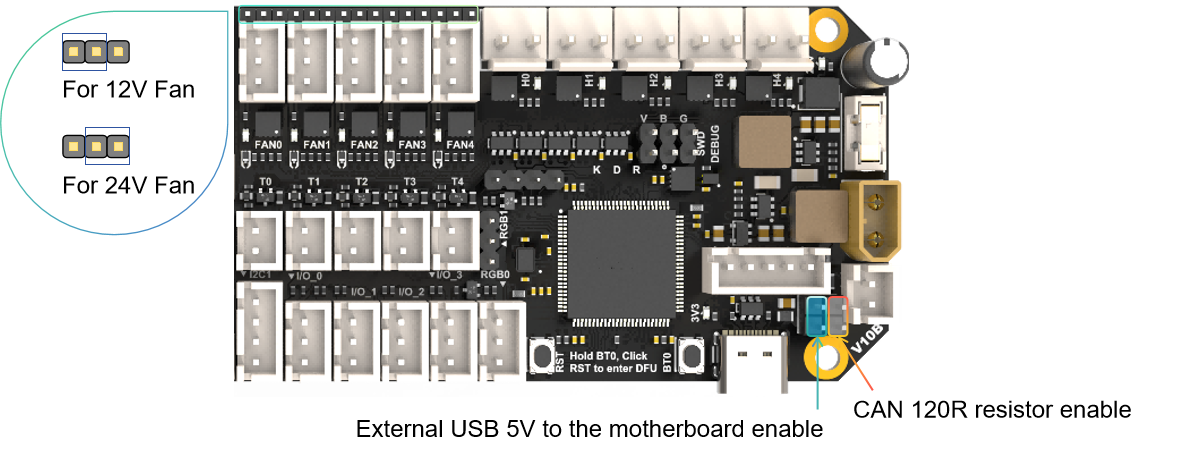
Jumpers
⚠️Waining
The USB 5V jumper is for facilitating firmware updates. Please remove this jumper cap when connecting a 24V power supply; otherwise, the onboard DC 5V will be directly connected to the USB 5V, and if the motherboard malfunctions, it may damage your USB host device.
Firmware Guide
Firmware Configuration and Compilation
Katapult Bootloader
Thanks to the great Katapult project for making Klipper firmware updates much easier. If you are willing to invest some time in reading Katapult's documentation, then I recommend you use it, otherwise just use the no booloader mode!
For more information about katapult, please refer to https://github.com/Arksine/katapult
The following is a simple guide, but please check the configuration options carefully!
cd katapult
make menuconfig
make flash FLASH_DEVICE=0483:df11
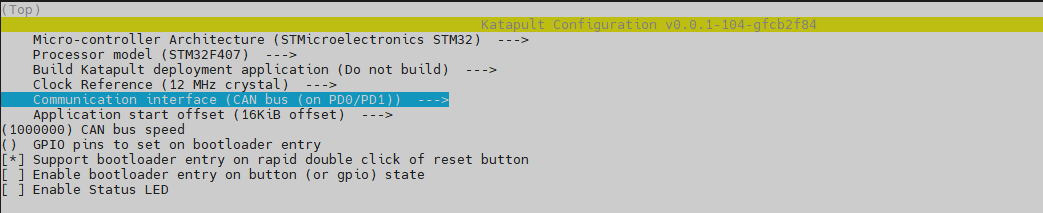
katapult Configuration For USB mode

katapult Configuration For CANBUS mode
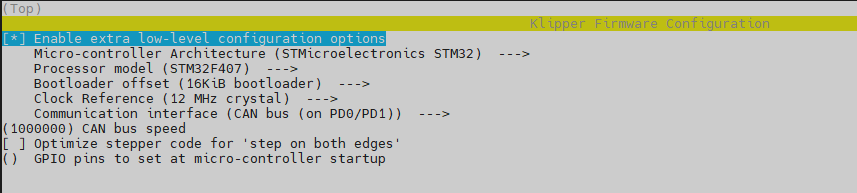
Klipper Firmware Configuration
Using Katapult Bootloader
USB Communication Mode

CANBUS Communication Mode
Using no bootloader
USB communication mode

CANBUS communication mode

Firmware Upload
No Bootloader Mode Or Upload The Katapult Bootloader
Command:
cd ~/klipper
make flash FLASH_DEVICE=0483:df11
Use The Katapult Bootloader Uploading Klipper
-
Make sure the klipper service stopped.
-
Build Klipper with CAN support and with the a bootloader offset matching that of the "application offset" in Katapult.
-
Enter the bootloader. Katapult automatically enters the bootloader if it detects that the application area of flash is empty. When upgrading from a currently flashed version of Klipper the flashtool.py script will command USB and CANBus devices to enter the bootloader. Note that "USB to CAN bridge devices" and "UART" devices cannot be auto-detected. If the device is not in bootloader mode it is necessary to first manually request the bootloader with the -r option, then rerun the script without -r to perform the upload. Devices running software other than Klipper will need to request the bootloader with their own method.
-
Run the flash script: For CAN Devices:
cd ~/katapult/scripts
python3 flashtool.py -i can0 -f ~/klipper/out/klipper.bin -u uuid
Replace with the appropriate uuid for your can device. If the device has not been previously flashed with Klipper, it is possible to query the bootloader for the uuid:
flashtool.py -i can0 -q
Example
- Make sure the katapult bootloader has been burned
- Double-click the RESET button to enter the bootloder
- Use the command (reafer to https://www.klipper3d.org/CANBUS.html)
~/klippy-env/bin/python ~/klipper/scripts/canbus_query.py can0
Find can uuid
- Use the uuid to update the firmware
python3 flashtool.py -i can0 -f ~/klipper/out/klipper.bin -u uuid
NOTE
A query should only be performed when a single can node is on the network. Attempting to query multiple nodes may result in transmission errors that can force a node into a "bus off" state. When a node enters "bus off" it becomes unresponsive. The node must be reset to recover.
For USB/UART devices: Before flashing, make sure pyserial is installed. The command required for installation depends on the the linux distribution. Debian and Ubuntu based distros can run the following commands:
sudo apt update
sudo apt install python3-serial
python3 flashtool.py -d
-b <baud_rate>
Replace <serial_device> the the path to the USB/UART device you wish to flash. The <baud_rate> is only necessary for UART devices, and defaults to 250000 baud if omitted.
Example
- Make sure the katapult bootloader has been burned
- Double-click the RESET button to enter the bootloder
- Use the command
ls /dev/serial/by-id
Find usb/uart mcu id
- Use the id to update the firmware
python3 flashtool.py -d /dev/serial/by-id/the_id_you_get -f ~/klipper/out/klipper.bin
Attachments
For more documents including configuration information, please check https://github.com/FYSETC/CHAMELEON_X5