
SB_Combo_V2
SB Combo V2
- Do not use SB1.3 cable directly with V2, their positive and negative positions are reversed.
- Using SB1.3 cable directly with V2 will 100% damage the V2 board.
- We strongly recommend replacing with a new cable.
- If you do not want to replace the cable, please connect the black of the original 1.3 cable to the + pole and the red to the - pole.
- The CANH and CANL of V2 are also opposite to those of 1.3.

Introduction
SB CAN V2 is a newly designed SB tool board running Klipper firmware. Based on STM32F072, it provides two communication modes: CANBUS and USB. The onboard USBHUB has up to three USB interfaces, which can be used to connect to the scanning leveling sensor (Scanner Leveling Sensor,such as IDM or Cartographer )and AI camera, etc. It can also be connected vertically with an optional board for easy use.
Features
- STM32F072 MCU, supports Klipper Firmware
- 6-layer PCB design, all solid capacitors and tantalum capacitors
- Onboard 2 M3 3.5mm isolation columns, no need for printed parts, easy to install
- Onboard CAN/USB switch
- Onboard RESET and BOOT0 buttons for easy firmware update
- Fan control/heating both use independent high-power MOS, safer and lower heat
- Onboard 5V@3A DC-DC, 5V peak load can reach 15W
- XT30 interface, customized connection cable comes with the board
- Onboard USB2.0 HUB, 3x USB2.0 interface (one of which is located on the auxiliary board)
- Support CAN / USB2.0 connection
- Supports auxiliary board connection For front cover quick install & remove Support
- Auxiliary board connection for quick installation and removal of the front cover. You can add 1x USB, 2x 3-wire fans, 1x RGB by the auxiliary board
- Onboard TMC2209
- 3x Fans, 3x IO with level converter, 1x RGB,1x Heat, 1x thermistor,1x status LED
- ADXL345 Accelerometer onboard
- USB-C onboard for Firmware update
Application
Voron StealthBurner Head
Hardware Specification
| Function | SB Combo V2 | SB TH CAN V1.3 |
|---|---|---|
| Microcontroller | STM32F072CBT6 | STM32F072CBT6 |
| Accelerometer | ADXL345 | ADXL345 |
| USB Port | 2 + 1 (For STM32F072) + 1(on aux board), Powered by CH334P | - |
| Fan | 3+2 (on aux board) | 2 |
| Heating output | 1 | 1 |
| Temperature measurement | 1 (PH2.0 connector) + 1 (on board thermistor) | 1(PH2.0 connector) |
| Voltage monitoring | 5V, 24V | - |
| Motor drive | TMC2209 | TMC2209 |
| Signal input and output | 3 | 3 |
| RGB light strip control | 1 + 1 (on aux board) | 1 |
| Aux Board support | Yes | No |
| Onboard mounting nut | Yes | No |
Operating Limits
| Stepper drivers | Up to 2.0A peak current |
|---|---|
| Mosfets Outputs | HE0 up to 5A , Fan up to 2.5A each |
| Input power voltage | 11V to 24V for VIN up to 10A |
| Inputs/Outputs | Signal 20ma maximum, RGB 2.5A total maximum |
| 5V and 3.3V current limit | 5V@3A ,3.3V@0.8A |
Physical Connections
Pin Out
On The SB_Combo Board
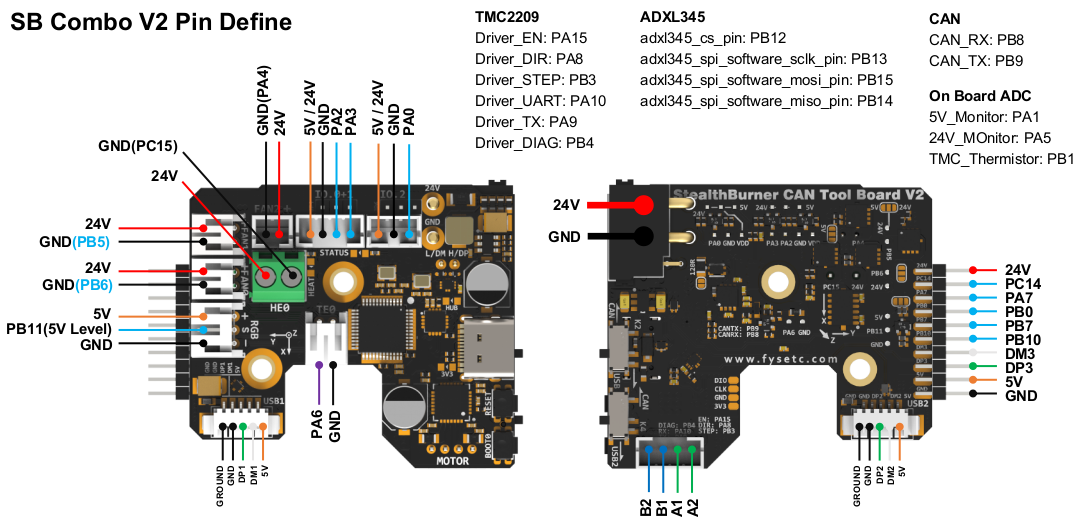
IO.0 and IO.1 are located in the same connector and can be used as XY endstops, and IO.2 can be used as a probe. In addition, IO.0, IO.1, and IO.2 have level conversion (with pull-up resistors) and voltage selectors (5V or 24V), which can be compatible with a variety of sensors. The three IOs and RGB can be used as inputs or outputs, and can be configured according to your needs.
IO.0: PA2
IO.1: PA3
IO.2: PA0
RGB: PB11

FAN0: PB6
FAN1: PB5
FAN2: PA4

Heat: PC15
Thermistor: PA6

Driver_EN: PA15
Driver_DIR: PA8
Driver_STEP: PB3
Driver_UART: PA10
Driver_TX: PA9
Driver_DIAG: PB4

spi_bus: spi2
adxl345_cs_pin: PB12
adxl345_spi_software_sclk_pin: PB13
adxl345_spi_software_mosi_pin: PB15
adxl345_spi_software_miso_pin: PB14

CAN_RX: PB8
CAN_TX: PB9

5V_Monitor: PA1
24V_MOnitor: PA5
TMC_Thermistor: PB1
On The AUX Board
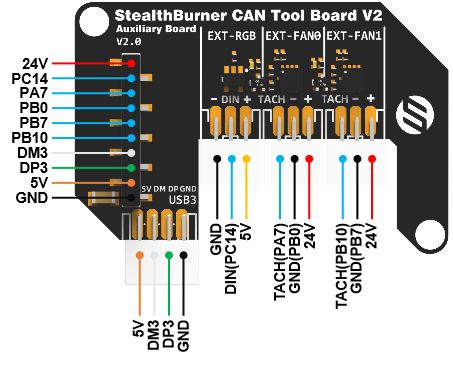
ext_IO.6: PA7
ext_fan0: PB0
ext_IO.5: PB10
ext_fan1: PB7
RGB: PC14
Description Of Connections:

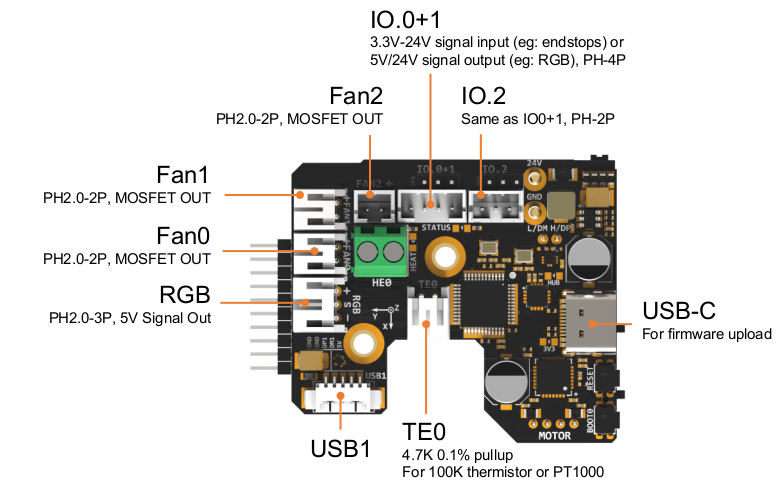
| Connector | Pin | Default function | Altermate |
|---|---|---|---|
| P1, Input | USB (PA11,PA12)CANBUS (PB8,PB9) |
Power and communication input, USB 2.0 and CANBUS are optional, selected by K2 DIP switch. | |
| Fan0 | PB6 | Mosfet Output, Printting Fan, Default voltage = VIN. | |
| Fan1 | PB5 | Mosfet Output, Hotend Fan, Default voltage = VIN. | |
| Fan2 | PA4 | Mosfet Output, SB Combo Cooling Fan, Default voltage = VIN. | |
| IO.0+1 | PA2, PA3 | Digital Input, For X Y endstop, Micro switch or Hall | Digital Output |
| IO.2 | PA0 | Digital Input, For Z probe, Proximity switch or Klicky, etc. | Digital Output |
| IO.3, RGB | PB11 | Digital Output, For WS2812/SK6812 RGB | Digital Input |
| J2, USB1 | USB2.0 | ||
| J1, USB2 | USB2.0 or CANBUS 2.0, USB 2.0 and CANBUS are optional, selected by K4 DIP switch. | ||
| TE0 | PA6 | ADC input, 4.7K pull-up, head temperature measure | |
| HE0 | PC15 | Mosfet Output, Heating rod control, 5A Max | |
| P2, AUX Board Interface | For connecting AUX board | Other Purposes | |
| MOTOR | For two-phase stepper motor, | ||
| USB1, USB-C connector | Connected to the CH334PHUB chip, up to 4 USB2.0 devices (MCU/USB1/USB2/USB3) |
LED Indications:
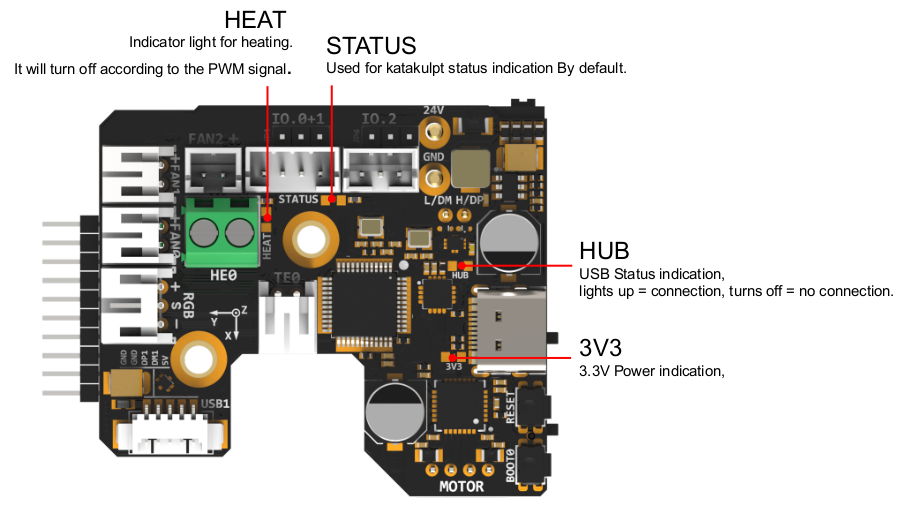
| LED name | Indicate | Remark |
|---|---|---|
| 3V3 | Lights up: Power supply OK.Turns off : Power supply failure. 3.3V is obtained by converting 24V to 5V through DC-DC and then to 3.3V through LDO, so there may be a short circuit/open circuit in 24V/5V/3.3V. |
|
| HUB | Lights up: The USB has at least one connection.``Turns off: The USB has no connection. | |
| STATUS | When using katakulpt - Blinking: Entering download mode;- Off/Always on: Not in download mode, the status is generally determined by config;``- The LED is controlled by PC13 and lights up at a high level. For customized usage, please refer to julianschill/klipper-led_effect |
|
| HEAT | Lights up or flashes according to the heating PWM |
CAN / USB Switching
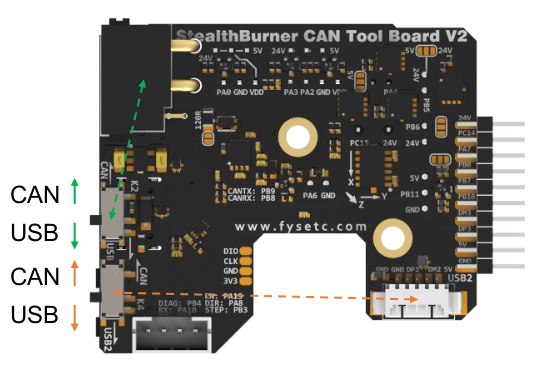
- As shown in the figure, the green-marked toggle switch is responsible for the input CAN/USB switching, which is located on the XT30 connector; the orange-marked toggle
- switch is responsible for the CAN/USB switching at the connector marked as USB2 (MX1.25-4P).
Jumpers: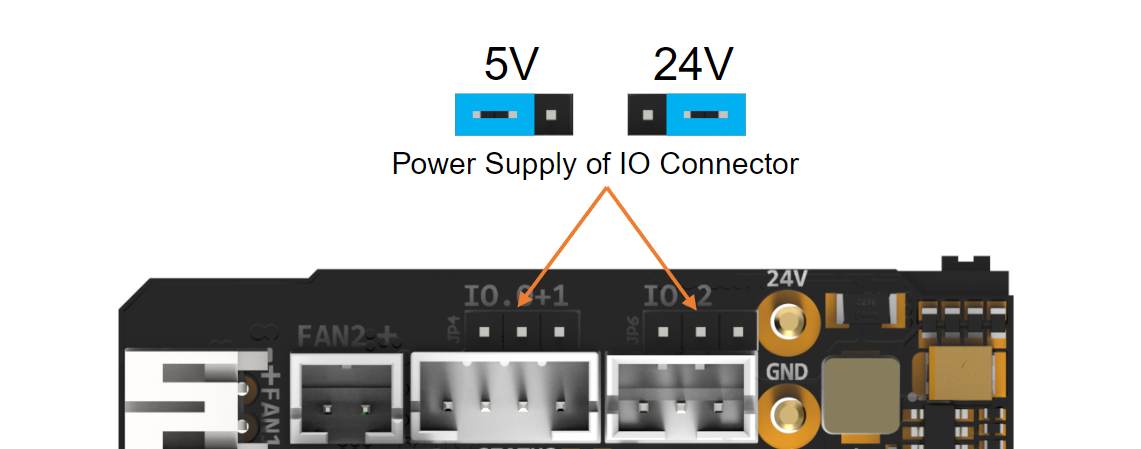
IO.0+1 and IO.2 can select the power supply voltage through the jumper cap.
As shown in the figure, the two pins on the left are connected together for 5V, and the two pins on the right are connected together for 24V.
Please note that if these interfaces are used as outputs, the high-level voltage of the output is consistent with the voltage selected by the jumper. Please make sure that your peripherals can withstand the range. Generally speaking, only SSR in the accessories of 3D printers can withstand 9-36V control voltage.
Communication
Connection To Pi
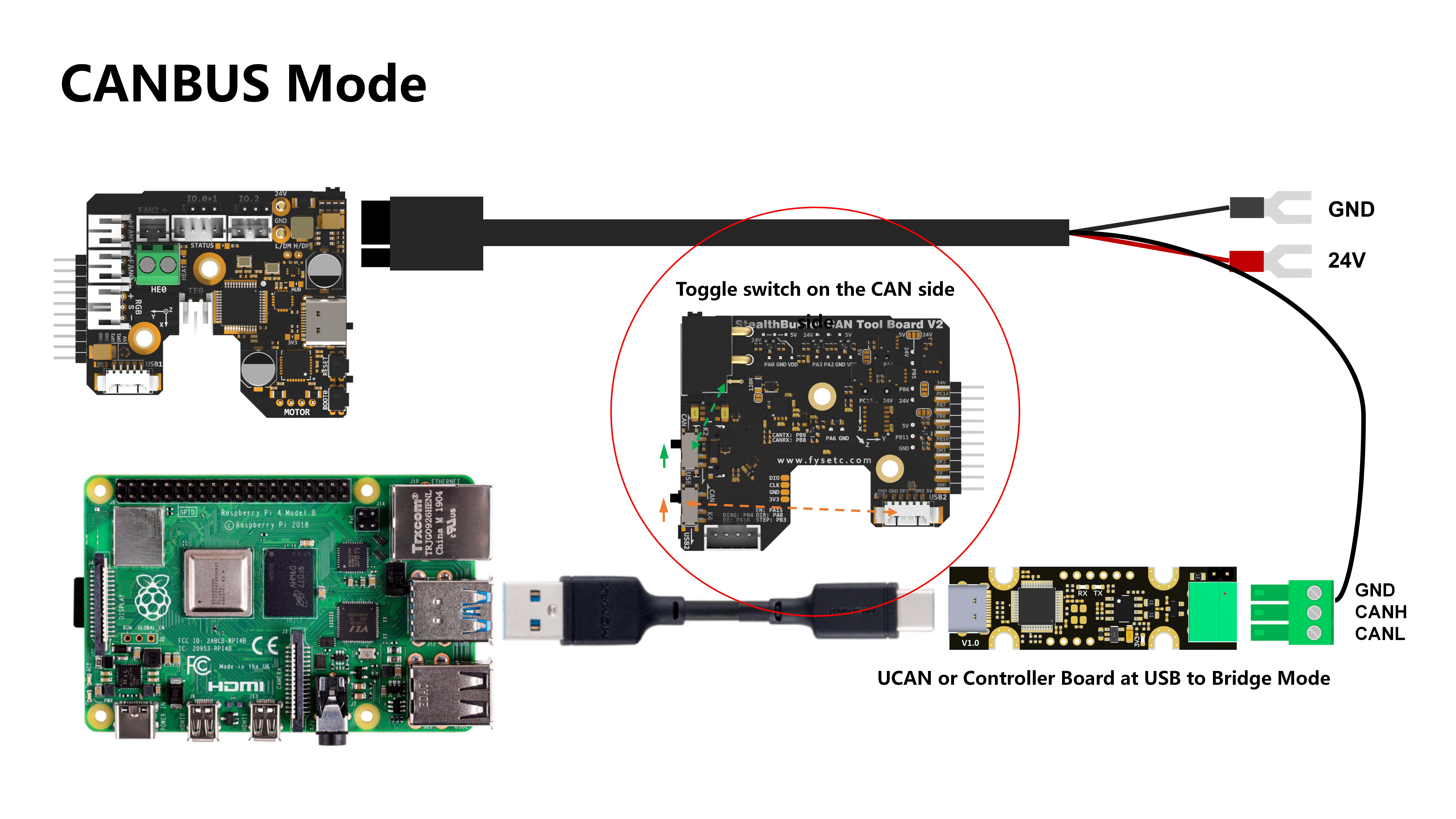
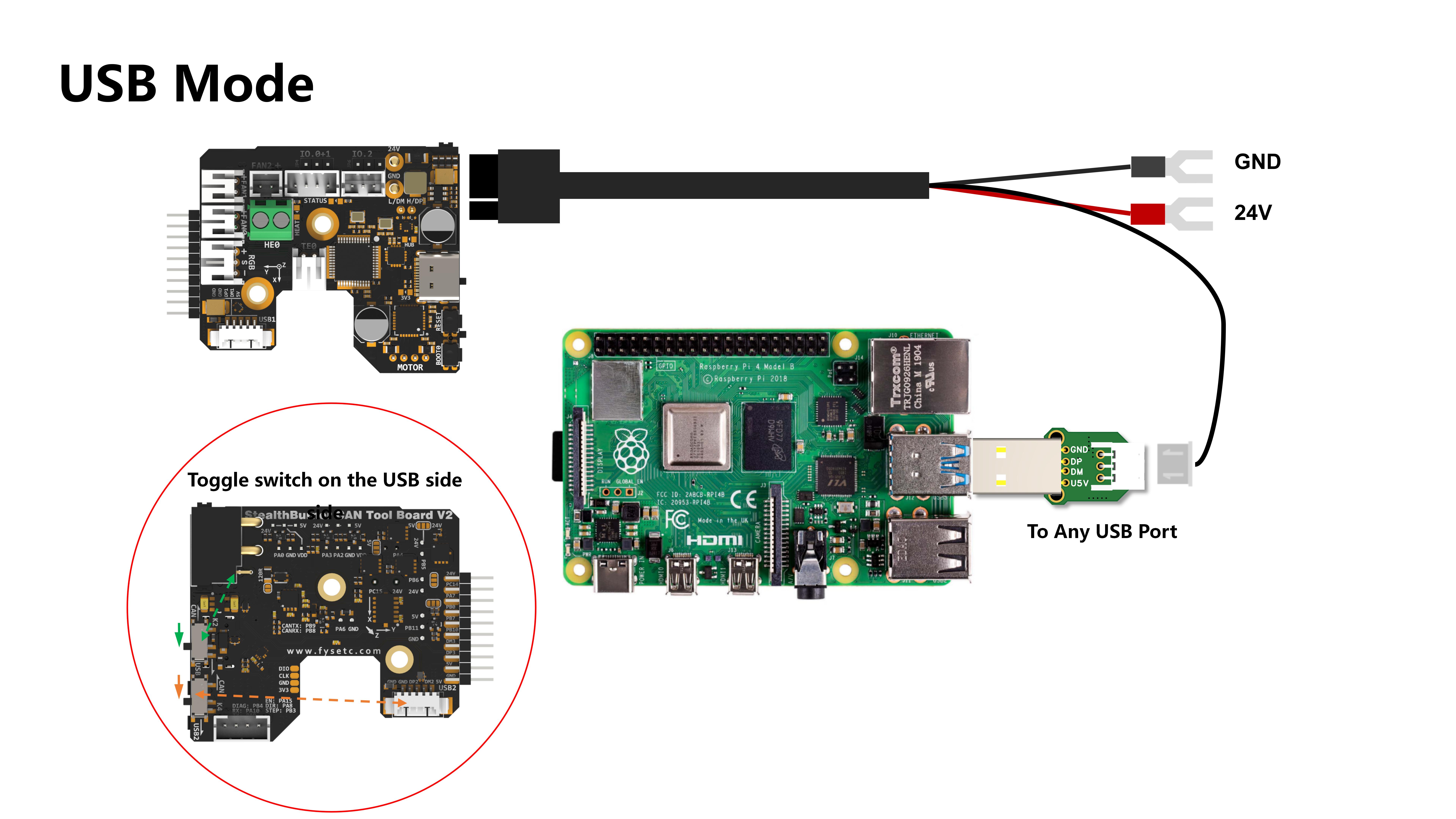
SB combo V2 can be connected to Pi via USB or CANBUS. Select by K2, refer to CAN / USB Switcher.
Via CAN
Since the Raspberry Pi does not have a CANBUS interface, it is usually connected only after the CANBUS interface is expanded through an expansion chip. Commonly used one of the
- MCP2518 SPI to CAN module (CanHat)
- USB to CAN module (eg: UCAN)
- Klipper USB to CAN Bridge Mode
- Linux host computer with a native CAN interface (eg: CM68)
Via USB
Connections
Fans
Temperature Sensor
Thermistor
PT1000
Motor
Endstops
Others
RGB
Proximity switches
Klicky
TAP
Firmware Guide
Firmware Configuration And Compilation
Katapult Bootloader
Thanks to the great Katapult project for making Klipper firmware updates much easier. If you are willing to invest some time in reading Katapult's documentation, then I recommend you use it, otherwise just use the no booloader mode!
For more information about katapult, please refer to https://github.com/Arksine/katapult
The following is a simple guide, but please check the configuration options carefully!
cd katapult
make menuconfig
make flash FLASH_DEVICE=0483:df11
katapult Configuration For USB mode
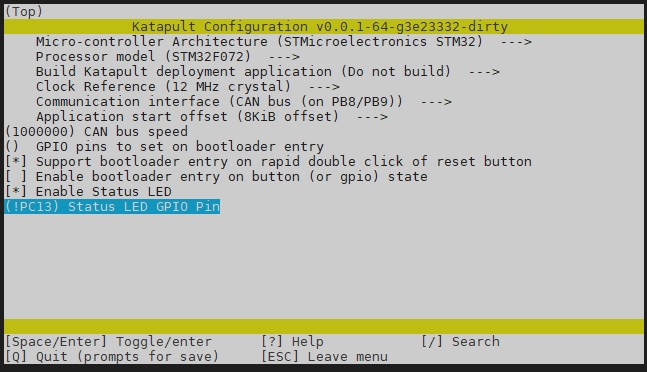
katapult Configuration For CANBUS mode

Klipper Firmware Configuration
Using Katapult Bootloader
USB Communication Mode

CANBUS Communication Mode

Using No Bootloader
USB Communication Mode

CANBUS Communication Mode

Firmware Upload
No Bootloader Mode Or Upload The Katapult Bootloader
Command:
cd ~/klipper
make flash FLASH_DEVICE=0483:df11
Use The Katapult Bootloader Uploading Klipper
-
Make sure the klipper service stopped.
-
Build Klipper with CAN support and with the a bootloader offset matching that of the "application offset" in Katapult.
-
Enter the bootloader. Katapult automatically enters the bootloader if it detects that the application area of flash is empty. When upgrading from a currently flashed version of Klipper the flashtool.py script will command USB and CANBus devices to enter the bootloader. Note that "USB to CAN bridge devices" and "UART" devices cannot be auto-detected. If the device is not in bootloader mode it is necessary to first manually request the bootloader with the -r option, then rerun the script without -r to perform the upload. Devices running software other than Klipper will need to request the bootloader with their own method.
-
Run the flash script: For CAN Devices:
cd ~/katapult/scripts
python3 flashtool.py -i can0 -f ~/klipper/out/klipper.bin -u
Replace with the appropriate uuid for your can device. If the device has not been previously flashed with Klipper, it is possible to query the bootloader for the UUID:
flashtool.py -i can0 -q
Example
- Make sure the katapult bootloader has been burned
- Double-click the RESET button to enter the bootloder, the sign is that the STATUS LED will flash
- Use the command (reafer to https://www.klipper3d.org/CANBUS.html)
~/klippy-env/bin/python ~/klipper/scripts/canbus_query.py can0
Find can uuid
- Use the uuid to update the firmware
python3 flashtool.py -i can0 -f ~/klipper/out/klipper.bin -u 02479ee3301f
NOTE
A query should only be performed when a single can node is on the network. Attempting to query multiple nodes may result in transmission errors that can force a node into a "bus off" state. When a node enters "bus off" it becomes unresponsive. The node must be reset to recover.
For USB/UART devices: Before flashing, make sure pyserial is installed. The command required for installation depends on the the linux distribution. Debian and Ubuntu based distros can run the following commands:
sudo apt update
sudo apt install python3-serial
python3 flashtool.py -d
-b <baud_rate>
Replace <serial_device> the the path to the USB/UART device you wish to flash. The <baud_rate> is only necessary for UART devices, and defaults to 250000 baud if omitted.
Example
- Make sure the katapult bootloader has been burned
- Double-click the RESET button to enter the bootloder, the sign is that the STATUS LED will flash
- Use the command
ls /dev/serial/by-id
Find can mcu id
- Use the id to update the firmware
python3 flashtool.py -d /dev/serial/by-id/the_id_you_get
Attachments
For more documents including configuration information, please check https://github.com/FYSETC/SB_Combo_V2/tree/main