
Software issues
1. I have a message on the display: "MCU unable to connect". How to fix this error?
If the MCU cannot connect, you can try Firmware_restart first.
If the problem persists, you need to check the hardware connection, firmware and configuration.
-
Make sure all cables are firmly connected and in the correct position;
-
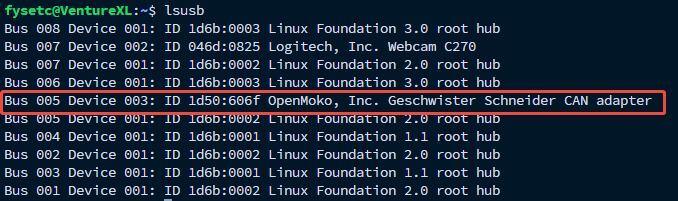
Use the "lsusb" command to view the USB device list. The correct one is shown in the red box in the figure below. If yours is different, please take a screenshot and send it to me so that I can help you determine what the problem is;
-
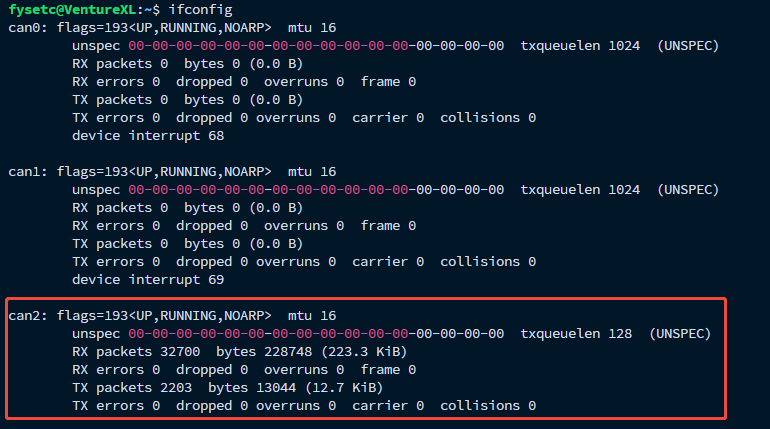
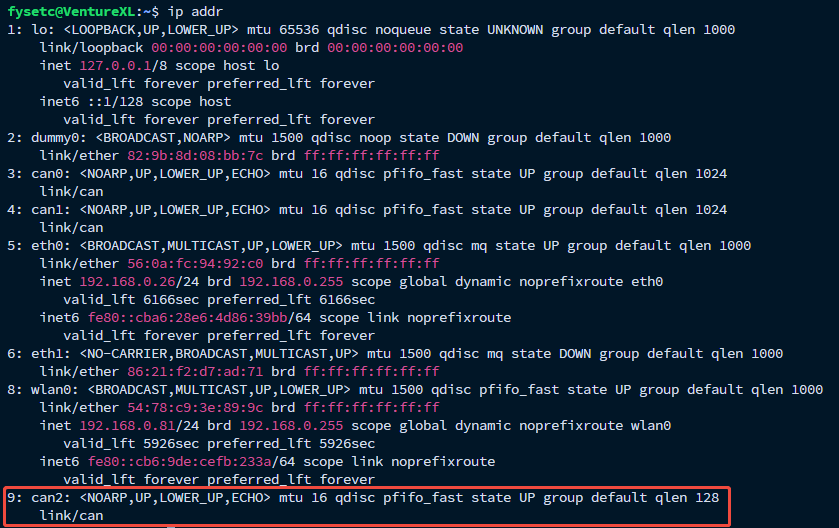
If it is consistent with the above figure, you need to confirm again whether canbus_uuid is configured correctly (we have configured uuid at the factory, but it is still worth checking this option to avoid negligence). The CAN interface here is provided by Spider_Pro's USB to CAN Bridge mode, which should be CAN2. Use
ifconfigorip addrto confirm whether CAN2 appears.
-
After confirming that CAN2 appears, use the following command to query uuid:
~/klippy-env/bin/python ~/klipper/scripts/canbus_query.py can2
If the device is not normal or the uuid is already in printer.cfg, you will be prompted as follows:
Total 0 uuids found
But if one or more uuids appear, it is because they are not correctly configured in printer.cfg, you can paste them manually.
However, you cannot determine which MCU it belongs to through the uuid. You can fill it in arbitrarily and then adjust it again according to the error message.
2. I have a message on the display: "Option calibration method in section scanner is deprecated". How to fix this error?
You should have updated the cartographer part of the system. The new cartographer no longer needs the calibration method item. You can comment out the entire line, that is, add # in front of this line, or delete this line directly.